
UTsend is a secure file transfer service for sharing files with people inside and outside the University of Toronto. Files transferred through UTsend are encrypted, authenticated, and scanned for viruses.
UTsend is particularly useful for transferring large files or confidential information that should not be sent through regular email. The service supports files up to 29 GB per message and is approved for transferring data classified up to and including Level 4 under the University’s Data Classification Standard.
Unlike cloud storage services such as Microsoft OneDrive, UTsend is intended for one-time file transfers rather than ongoing collaboration or file storage. Files remain available through UTsend for 14 days.
When to Use UTsend
UTsend may be appropriate when you need to:
- Share confidential information: Securely transfer student records, grades, or other sensitive files to authorized recipients.
- Transfer large files: Send files that are too large for regular email attachments, up to 29 GB per message.
- Share files with external recipients: Transfer files to colleagues or collaborators outside the University.
- Request files securely: U of T faculty, librarians, and staff can send file request links to receive files through UTsend.
For files that require ongoing collaboration, frequent revisions, or long-term storage, consider using Microsoft OneDrive instead.
Accessing and Using UTsend
UTsend is available at send.utoronto.ca. U of T faculty, librarians, and staff can access the service using their UTORid.
You can send a file to someone through UTsend by “dropping off” the file into the application. Downloading a file that someone else has sent to you is referred to as a file “pick up”.
Recipients receive notifications by email, but file transfers take place through the UTsend website rather than through email attachments.
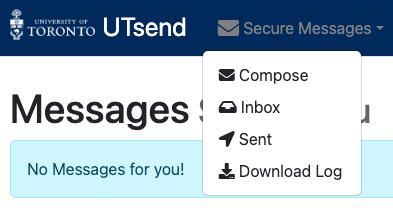
To access the file transfer options, sign in to UTsend and use the Secure Messages menu to compose a new message, review received files, access sent messages, or download a log of your transfers.
Note: UTsend stores transferred files for 14 days and is not intended for long-term storage. Save any files you need to retain in an appropriate University-approved storage location.
Security Considerations
UTsend has been evaluated by the University of Toronto’s Information Security team and is approved for transferring data classified up to and including Level 4.
Examples of information that instructors may work with include:
- Level 3 data: Student names, student numbers, grades, and academic records. Research data classified as confidential by funding agencies or research ethics boards may also fall within this level.
- Level 4 data: Personal health information and research data requiring stronger security controls.
For full definitions and requirements, consult the University’s Data Classification Standard.
When sharing confidential or highly sensitive information, ensure that recipients are authorized to access the files and follow any applicable University policies and data-handling requirements.
Additional Information and Support
For information about service availability, eligibility, and technical support, consult the University’s UTsend service listing in the UniversITy Service Catalogue or contact the Enterprise Service Centre.