Quercus Rubrics

canvas logo
What Can I Use It For?

Rubrics can be used for increasing grading efficiency, improving students’ understanding of expectations, and monitoring performance. Once you create a rubric, the rubric is saved in your course for future use.

You can add the rubric to a:

Special Notes

Rubric Settings: Be sure to review all Rubric Settings, including adding point values for rubric grading criteria, and consult with your Divisional support representative before grading student assignment submissions. Any changes to Rubric Settings that are made after grading has begun may not be accurately reflected in the assignment and may result is grade discrepancies.

This Academic Toolbox tool helps you...
Assess Learning
Typical course activity format:
Asynchronous
Quercus integration
Built-in tool

Where can I get more support?

Related resources / similar tools

Cost
Centrally funded

How to Get Started

You can create a rubric from either the Rubrics area (for reuse across multiple assessments) or directly from within an Assignment, Discussion, or Quiz.

The Rubrics area can be found in your course menu:
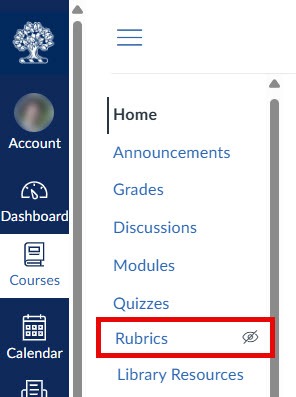
Location of Rubrics in a Quercus course menu

Last Modified:

10 September, 2026

Back to Top
