

The Four Tiers of AI Tools at a Glance
The University of Toronto supports instructors in using generative AI tools through the AI Kitchen — a secure environment that provides vetted applications, appropriate data handling, and technical frameworks for responsible use. This page organizes available tools into four tiers based on their level of institutional support, data protection, and instructor responsibility.
Comparing the Tiers
| Tier 1 | Tier 2 | Tier 3 | Tier 4 | |
|---|---|---|---|---|
| Current tools | Microsoft Copilot Chat, Scopus AI | Cogniti | ChatGPT Edu, Claude for Education | Unvetted tools |
| In the AI Kitchen? | Yes | Yes | Yes | No |
| Student access | All students (UTORid) | Students in participating courses via Quercus | Requires provisioned accounts | Requires personal accounts |
| Customization | None | Full system prompt control | Full, including custom agents | Varies; no institutional guardrails |
| Cost | Free | Free | ChatGPT Edu is paid; Claude Edu is free (limited pilot seats) | May require paid subscription |
Choosing the Right Tier
“I want all students to have free, equal access to an AI tool with no setup.” → Tier 1 (Copilot). Every student can use it today by signing in with their UTORid.
“I want a course-specific AI tutor that lives inside Quercus.” → Tier 2 (Cogniti). Join the Virtual Tutor Initiative through CTSI.
“I want to build custom AI agents with advanced features for my students.” → Tier 3 (ChatGPT Edu or Claude for Education), if you can secure provisioned accounts for students. Otherwise, consider whether Cogniti can meet your needs.
“I want to use a specialized or cutting-edge tool that isn’t available through U of T.” → Tier 4, with full awareness of the additional responsibilities. Review the guidance on the Non-Supported Tools tab and ensure your course outline addresses all required disclosures.
“I’m not sure yet.” → Start with Tier 1. It’s immediately available, requires no setup, and carries no additional obligations. Use it to explore what AI can do in your teaching context, then consider whether a higher tier is warranted.
Getting Help
| Question type | Contact |
|---|---|
| Technical, privacy, data classification, account provisioning, platform capabilities | AI Kitchen — ai.kitchen@utoronto.ca |
| Course design, system prompts, AI literacy, teaching strategies | CTSI — teaching.utoronto.ca / ctsi.teaching@utoronto.ca |
Microsoft Copilot Chat
- What It is
- What You Can Do With Copilot
- What to Communicate to Students
- Example Syllabus Language
What It Is
Microsoft Copilot Chat is a general-purpose AI chatbot available through the institutional Microsoft 365 suite. When you sign in with your UTORid, Copilot operates in protected mode — your prompts are not collected by Microsoft for model training, and the tool conforms to U of T’s data protection standards for information up to Level 3. It is available to all students, staff, librarians, and faculty at no cost.
Scopus AI is also in this tier. The University of Toronto Libraries has subscribed to Scopus AI as part of its Scopus database subscription, enabling access for the University community. It is an intelligent search tool powered by generative AI that provides enhanced search results from the Elsevier catalogue.
What You Can Do With Copilot
Copilot is well-suited for a range of teaching and learning tasks: brainstorming, drafting and revising text, summarizing concepts, generating discussion questions, and more. With thoughtful prompting, it can support many instructional purposes.
What it cannot do is act as a course-specific tutor. You cannot upload course materials, customize its instructions, or create a tailored agent. Every user interacts with the same general-purpose model.
For guidance on getting the most out of Copilot, see CTSI’s [Microsoft Copilot Tool Guide →]
What to Communicate to Students
Because Copilot is part of U of T’s institutional academic toolbox — fully vetted, universally accessible, and covered by the University’s existing privacy notice — it does not require a separate notice on the course outline, in the same way that tools like Quercus, Teams, or OneDrive do not. Instructors may require students to use Copilot as part of course activities, just as they may require the use of other institutional software.
That said, if you are asking students to use Copilot as part of a specific learning activity or assessment, it is good practice to explain this clearly — not as a privacy notice, but as a pedagogical one. Students should understand what you’re asking them to do, why, and what the tool’s limitations are.
Example Syllabus Language
"In this course, you may be asked to use Microsoft Copilot Chat to generate initial drafts or explore ideas as part of certain assignments. Copilot is available to all U of T students at no cost through your institutional Microsoft account. When signed in with your UTORid, your interactions are protected and not used for AI model training."
Cogniti
- What It Is
- What You Can Do With It
- Opportunities and Considerations
- What to Communicate to Students
- Example Syllabus Language
- Getting Started
What It Is
Cogniti is a generative AI chatbot integrated directly into Quercus, designed to serve as a course-specific virtual tutor. Instructors upload course materials and write a system prompt that shapes how the chatbot interacts with students. Cogniti is part of the Artificial Intelligence Virtual Tutor Initiative, sponsored by CTSI and ITS.
A key feature of Cogniti is its layered prompt architecture. Instructors control the course-specific system prompt, while CTSI maintains a global system prompt that provides baseline safety instructions that cannot be overridden at the course level. This global prompt directs the chatbot to stay focused on course-related topics and to decline requests for advice, counselling, or emotional support. If signs of mental or physical distress are detected, the chatbot will disengage from the conversation and direct the student toward appropriate U of T support resources, including crisis supports. This institutional safety layer is a significant differentiator from tools in other tiers, where the instructor alone is responsible for considering such boundaries.
What You Can Do With It
Cogniti gives you meaningful control over the student experience. You can tailor the chatbot’s persona, instructional approach, and scope. For example, you might configure it to use Socratic questioning rather than providing direct answers, or restrict it to topics covered in specific course modules.
Because Cogniti is integrated within Quercus, students access it through the same platform they already use for course materials, assignments, and grades. There is no separate account creation or cost.
CTSI provides resources and dedicated sessions to support you in developing effective system prompts and preparing course content.
Opportunities and Considerations
Virtual tutors can provide on-demand practice and personalized explanations, are available without waiting for office hours, and may free up instructors and TAs to focus on students with complex needs. At the same time, over-reliance on virtual tutors may reduce opportunities for students to develop help-seeking and planning skills, to build learning communities through study groups and discussion, and to form relationships with instructors and TAs.
A virtual tutor is most effective when positioned as one component of a broader learning experience, not as a replacement for human interaction. Any course-specific AI tool should be deployed only after appropriate testing to ensure it is providing high-quality assistance on course content.
What To Communicate To Students
Cogniti is currently a pilot project. During the pilot phase, student use is voluntary and instructors should not make it a required component of course completion.
Even during the pilot, transparency is important. If you are using Cogniti in your course, communicate this to students clearly. Explain what the virtual tutor does, how it uses their course materials, and that their interactions are protected within the Quercus environment.
Students should also be aware that the virtual tutor is an AI tool, not a human, and that its responses — while grounded in your course materials — are not guaranteed to be accurate. Encourage students to verify important information against course materials and to raise any concerns with you directly.
CTSI has developed a [Cogniti Terms of Use →] document that addresses key student-facing questions, including the voluntary nature of participation, data privacy protections, how conversation data is handled, and the conditions under which interactions may be reviewed. Instructors participating in the Virtual Tutor Initiative should share this document with students and include it (or adapt its language) in their course outline.
Example Syllabus Language
"This course is participating in the University of Toronto's AI Virtual Tutor Initiative, using Cogniti — a generative AI chatbot integrated within Quercus and tailored to course content. Your engagement with the virtual tutor is entirely voluntary and will not impact your grades or standing. The platform has been vetted for data privacy and security, and your interactions will remain anonymous except in very limited circumstances. Please review the full Cogniti Terms of Use for details."
Getting Started
To join the Virtual Tutor Initiative, complete the Expression of Interest Form
See CTSI’s Cogniti Tool Guide for setup instructions, system prompt development guidance, and content preparation resources.
Resources for participating instructors:
- AI Virtual Tutors – Effective Prompting Strategies: Offers evidence-based prompting techniques and sample questions to help students get the most out of AI virtual tutors, supporting personalized learning, critical thinking, and deeper understanding of course material.
Web page | PDF | Word - AI Virtual Tutors – Developing an Effective System Prompt: Offers strategies to translate your teaching goals into effective system prompts that scaffold student learning and maintain pedagogical integrity.
Web page | PDF | Word - Preparing Content for Custom AI Chatbots: Guidance on how to organize, clean, and format course materials for use with custom AI chatbots, ensuring accurate, relevant, and efficient AI responses.
Web page | PDF | Word
For more downloadable GenAI resources: CTSI Resources
ChatGPT Edu & Claude for Education
- What They Are
- The Access Challenge
- What to Communicate to Students
- Example Syllabus Language
What They Are
ChatGPT Edu (from OpenAI) and Claude for Education (from Anthropic) are institutionally vetted versions of consumer AI products. Under U of T’s enterprise agreements, these tools meet the same data protection standards as Tier 1 and 2 tools — institutional data up to Level 3 can be used, and user data is not used for model training.
These tools offer advanced capabilities beyond what Copilot provides, including custom agent creation (GPTs in ChatGPT, Projects in Claude), image generation, code interpretation, and file analysis.
Access and cost differ between the two tools:
- ChatGPT Edu is a paid service. The University does not cover the cost centrally — instructors and departments purchase licences individually through the [Licensed Software Office →]. Student accounts, if needed, must also be purchased separately.
- Claude for Education is available at no cost to approved pilot participants, but has limited seats. Instructors can request access by completing the [Expression of Interest form via ServiceNow →].
For more information, see CTSI’s [ChatGPT Edu Tool Guide →].
The Access Challenge
This is the critical distinction to understand before building with these tools: while instructors may have access to an Edu account, students generally do not unless accounts have been specifically purchased or provisioned through a grant, departmental funding, or a pilot program.
At U of T, both ChatGPT Edu and Claude for Education are configured so that custom agents built by instructors cannot be shared with non-provisioned users. This means that if your students do not have Edu accounts, they cannot access your custom chatbot — there is no link-sharing workaround. This protects students from inadvertently interacting under consumer terms of service with weaker data protections, but it also means that without provisioned accounts, the advanced customization features of these tools are unavailable to your students.
Before choosing a Tier 3 tool, consider whether all students will have equivalent access and whether the learning experience can be delivered equitably.
What To Communicate To Students
If you are using a Tier 3 tool in your course, this should be clearly communicated on the course outline. Students need to know what tool is being used, whether they need an account, how that account is being provided, and what data protections are in place.
Where students have been provided with provisioned accounts at no cost, a Tier 3 tool may be treated similarly to other required course technologies — such as Quercus or discipline-specific software — provided that the tool use is directly tied to course learning outcomes. Where accounts have not been provisioned, students cannot be required to use the tool, and a viable alternative must be available.
Unlike Cogniti, these tools do not include an institutional safety layer that restricts conversations to course-related topics or redirects students in distress toward U of T resources. If you build a custom agent, you should consider establishing appropriate boundaries in your system prompt. Contact CTSI at ctsi.teaching@utoronto.ca for support with this.
Example Syllabus Language
"This course uses [Tool Name], an AI platform available to you through a university-provisioned account. Your account is protected under U of T's enterprise agreement — your data is stored securely and is not used for AI model training. You will receive instructions for accessing your account during the first week of class. If you have concerns about using this tool, please contact the instructor to discuss alternative arrangements."
Non-Supported Tools
- What They Are
- Key Risks
- What to Communicate to Students
- Example Syllabus Language
- Additional Guidance and Resources
What They Are
This tier covers any AI tool that has not been vetted or licensed by the University and is therefore outside the AI Kitchen. This includes personal ChatGPT accounts, Google Gemini, open-source models, discipline-specific AI tools, and any custom agents built on non-institutional platforms.
These tools may offer capabilities not available through supported options, and there may be legitimate pedagogical reasons to explore them. However, they come with significant additional responsibilities for the instructor.
As with Tier 3, non-supported tools do not include institutional safety guardrails. You are fully responsible for configuring appropriate boundaries, including ensuring the tool does not engage with students on non-course-related matters such as personal advice, counselling, or emotional support. Contact CTSI at ctsi.teaching@utoronto.ca for support with this.
Key Risks to Consider
Privacy and data protection. Non-vetted tools may use student prompts and interaction data for model training or share it with third parties. Students may be asked to agree to terms of service that are not aligned with U of T’s data protection standards.
Equity. Many of these tools require paid subscriptions for full functionality. Students cannot be compelled to pay for non-university tools, and free tiers often come with reduced privacy protections.
Sustainability. Non-supported tools may change their terms of service, pricing, or functionality at any time. If a tool you have built your course around becomes unavailable or fundamentally changes mid-term, there is no institutional support to fall back on.
Support. You are responsible for all technical support, training, and troubleshooting — for yourself, your TAs, and your students. The AI Kitchen and CTSI do not provide end-user support for non-vetted tools.
Privacy Impact Assessments. As of July 1, 2025, the University requires a Privacy Impact Assessment (PIA) before collecting personal information through new systems or tools. For tools within the AI Kitchen (Tiers 1–3), this has been done at the institutional level. For Tier 4 tools, a PIA may be required before you deploy the tool in your course. The assessment process typically takes four to eight weeks and is conducted by the University’s Information Security team at no cost. Contact [Information Security →] or the AI Kitchen at ai.kitchen@utoronto.ca to determine whether a PIA is needed.
What To Communicate to Students
Use of any Tier 4 tool must be explicitly described on the course outline. You must:
- State clearly what tool is being used and for what purpose.
- Indicate whether students are required to create an account, and advise them not to reuse their UTORid password.
- Provide links to the tool’s privacy policy and terms of service.
- If the tool is used for a required activity or assessment, provide a viable alternative for students who do not consent.
- Remind students not to include personal information in their prompts.
- Address any known accessibility barriers.
Example Syllabus Language
"Some activities in this course involve the use of [Tool Name], an AI platform that is not part of U of T's supported software suite. Use of this tool is optional; an alternative activity is available for students who prefer not to create an account. If you choose to use [Tool Name], please review its privacy policy at [link] and be aware that your interactions may be used by the provider for model training. Do not include personal information in your prompts, and do not use your UTORid password when creating an account."
Additional Guidance and Considerations
- [Considerations for non-supported tools (existing CTSI guidance) →]
- [Privacy Impact Assessments — Information Security →]
- [U of T Library — Generative AI Tools and Copyright Considerations →]
- [Use AI Intelligently — U of T Information Security →]
- [Tools Beyond Quercus →]
Drop-In Session: Getting Started with GenAI Tools at U of T (Tuesday, April 28, 2:00-3:00 pm)
Every second Tuesday from January 6 to April 28, 2:00-3:00 pm
Join us for an interactive virtual drop-in designed for U of T instructors and staff. We’ll provide an overview of the University’s approved generative AI tools with hands-on demonstrations, including a comparison of available platforms, secure login walkthroughs, and live feature demonstrations.
Drop in anytime between 2:00 PM and 3:00 PM – stay for a few minutes or the full session!
Introduction to Cogniti: U of T’s AI Tool to Support Student Learning (Tuesday, May 5, 12:10-1:00 pm)
Tuesday, May 5, 12:10-1:00 pm
Research shows that generative AI tool design matters for learning. The OECD Digital Education Outlook 2026 finds that AI tools with clear educational guardrails may support learning outcomes, while unstructured use of AI risks becoming a shortcut that may hamper genuine learning gains.
Through Cogniti, U of T is giving instructors control over how AI is used for learning. Cogniti is an AI platform embedded directly in Quercus — no separate accounts required — that lets you shape AI interactions around your course content, your learning objectives, and your pedagogical approach, with built-in safety features to protect student wellbeing.
In this session, you’ll explore how Cogniti enables you to:
- Deploy course-specific generative AI learning experiences in Quercus that reflect your syllabus, learning objectives, and content
- Guide students toward productive learning rather than answer-seeking
- Monitor how students are engaging with AI in your course
Whether you’re curious about AI’s potential, concerned about its risks, or ready to experiment, we’ll work through how Cogniti can fit within your teaching context.
Cogniti Onboarding: Setting Up Your AI Tool for Student Use (Tuesday, May 12, 2:10-3:00 pm)
Tuesday, May 12, 2:10-3:00 pm
Cogniti is U of T’s platform for building course-specific AI tutors: grounded in your content, aligned with your pedagogy, and deployed directly in Quercus. In this session, we will walk you through everything you need to get your tutor up and running, including how to:
- Define a purpose and pedagogical role for your AI tutor
- Learn about the safety guardrails already built in Cogniti and how to include your own
- Craft an effective system prompt that guides your tutor’s tone, scope, and responses
- Upload and integrate your own course materials to ground your tutor in your content
- Leave with a working tutor draft ready for further refinement or deployment
No prior experience with Cogniti is required: this session is designed for instructors who are just getting started.
Introduction to Cogniti: U of T’s AI Tool to Support Student Learning (Thursday, May 21, 12:10-1:00 pm)
Thursday, May 21, 12:10-1:00 pm
Research shows that generative AI tool design matters for learning. The OECD Digital Education Outlook 2026 finds that AI tools with clear educational guardrails may support learning outcomes, while unstructured use of AI risks becoming a shortcut that may hamper genuine learning gains.
Through Cogniti, U of T is giving instructors control over how AI is used for learning. Cogniti is an AI platform embedded directly in Quercus — no separate accounts required — that lets you shape AI interactions around your course content, your learning objectives, and your pedagogical approach, with built-in safety features to protect student wellbeing.
In this session, you’ll explore how Cogniti enables you to:
- Deploy course-specific generative AI learning experiences in Quercus that reflect your syllabus, learning objectives, and content
- Guide students toward productive learning rather than answer-seeking
- Monitor how students are engaging with AI in your course
Whether you’re curious about AI’s potential, concerned about its risks, or ready to experiment, we’ll work through how Cogniti can fit within your teaching context.
Cogniti Onboarding: Setting Up Your AI Tool for Student Use (Wednesday, May 27, 12:10-1:00 pm)
Wednesday, May 27, 12:10-1:00 pm
Cogniti is U of T’s platform for building course-specific AI tutors: grounded in your content, aligned with your pedagogy, and deployed directly in Quercus. In this session, we will walk you through everything you need to get your tutor up and running, including how to:
- Define a purpose and pedagogical role for your AI tutor
- Learn about the safety guardrails already built in Cogniti and how to include your own
- Craft an effective system prompt that guides your tutor’s tone, scope, and responses
- Upload and integrate your own course materials to ground your tutor in your content
- Leave with a working tutor draft ready for further refinement or deployment
No prior experience with Cogniti is required: this session is designed for instructors who are just getting started.
Designing Assessments with UDL and GenAI in Mind (Thursday, May 28, 1:00-2:30 pm)
Thursday, May 28, 1:00-2:30 pm
This session explores three key moments in assessment design—assessment preparation (instructions, expectations, and framing), student demonstration of learning, and feedback and reflection—through the lens of Universal Design for Learning (UDL) and the evolving role of generative AI (GenAI). Participants will analyze brief case studies and use design prompts to refine an assessment from their own teaching contexts, with the goals of reducing barriers, supporting learner variability, and aligning with essential learning outcomes.
By the end of this session, participants will be able to:
- Identify three key moments in assessment design: preparation (instructions, expectations, and framing), student demonstration of learning, and feedback and reflection
- Analyze assessment design through a UDL lens to identify potential barriers and opportunities to support learner variability
- Recognize how generative AI (GenAI) may influence assessment design in their teaching context
- Plan 1–2 concrete adjustments they could make to an existing assessment
Customizing Cogniti: Aligning for Different Learning Goals (Friday, May 29, 11:10-12:00 pm)
Friday, May 29, 11:10 am – 12:00 pm
Once your Cogniti tutor is up and running, the real work begins: aligning it to what you want students to learn and how you want them to engage. Different learning goals call for different tutor designs, and changes to your system prompt can shift how students interact with AI support in your course.
In this session, you will:
- Explore how system prompts can be tailored to support different learning goals, from concept checking and writing feedback to study support and guided inquiry
- Compare tutor designs across disciplines and course contexts
- Discuss strategies for communicating your tutor’s purpose and boundaries to students
- Explore advanced Cogniti features that expand what your tutor can do
This session is designed for instructors who have completed Cogniti Onboarding or already have a tutor deployed and are ready to take it further.
Introduction to Cogniti: U of T’s AI Tool to Support Student Learning (Monday, June 1, 12:10-1:00 pm)
Monday, June 1, 12:10-1:00 pm
Research shows that generative AI tool design matters for learning. The OECD Digital Education Outlook 2026 finds that AI tools with clear educational guardrails may support learning outcomes, while unstructured use of AI risks becoming a shortcut that may hamper genuine learning gains.
Through Cogniti, U of T is giving instructors control over how AI is used for learning. Cogniti is an AI platform embedded directly in Quercus — no separate accounts required — that lets you shape AI interactions around your course content, your learning objectives, and your pedagogical approach, with built-in safety features to protect student wellbeing.
In this session, you’ll explore how Cogniti enables you to:
- Deploy course-specific generative AI learning experiences in Quercus that reflect your syllabus, learning objectives, and content
- Guide students toward productive learning rather than answer-seeking
- Monitor how students are engaging with AI in your course
Whether you’re curious about AI’s potential, concerned about its risks, or ready to experiment, we’ll work through how Cogniti can fit within your teaching context.
Cogniti Onboarding: Setting Up Your AI Tool for Student Use (Tuesday, June 9, 2:10-3:00 pm)
Tuesday, June 9, 2:10-3:00 pm
Cogniti is U of T’s platform for building course-specific AI tutors: grounded in your content, aligned with your pedagogy, and deployed directly in Quercus. In this session, we will walk you through everything you need to get your tutor up and running, including how to:
- Define a purpose and pedagogical role for your AI tutor
- Learn about the safety guardrails already built in Cogniti and how to include your own
- Craft an effective system prompt that guides your tutor’s tone, scope, and responses
- Upload and integrate your own course materials to ground your tutor in your content
- Leave with a working tutor draft ready for further refinement or deployment
No prior experience with Cogniti is required: this session is designed for instructors who are just getting started.
Introduction to Cogniti: U of T’s AI Tool to Support Student Learning (Tuesday, June 16, 12:10-1:00 pm)
Tuesday, June 16, 12:10-1:00 pm
Research shows that generative AI tool design matters for learning. The OECD Digital Education Outlook 2026 finds that AI tools with clear educational guardrails may support learning outcomes, while unstructured use of AI risks becoming a shortcut that may hamper genuine learning gains.
Through Cogniti, U of T is giving instructors control over how AI is used for learning. Cogniti is an AI platform embedded directly in Quercus — no separate accounts required — that lets you shape AI interactions around your course content, your learning objectives, and your pedagogical approach, with built-in safety features to protect student wellbeing.
In this session, you’ll explore how Cogniti enables you to:
- Deploy course-specific generative AI learning experiences in Quercus that reflect your syllabus, learning objectives, and content
- Guide students toward productive learning rather than answer-seeking
- Monitor how students are engaging with AI in your course
Whether you’re curious about AI’s potential, concerned about its risks, or ready to experiment, we’ll work through how Cogniti can fit within your teaching context.
Cogniti Onboarding: Setting Up Your AI Tool for Student Use (Tuesday, June 23, 2:10-3:00 pm)
Tuesday, June 23, 2:10-3:00 pm
Cogniti is U of T’s platform for building course-specific AI tutors: grounded in your content, aligned with your pedagogy, and deployed directly in Quercus. In this session, we will walk you through everything you need to get your tutor up and running, including how to:
- Define a purpose and pedagogical role for your AI tutor
- Learn about the safety guardrails already built in Cogniti and how to include your own
- Craft an effective system prompt that guides your tutor’s tone, scope, and responses
- Upload and integrate your own course materials to ground your tutor in your content
- Leave with a working tutor draft ready for further refinement or deployment
No prior experience with Cogniti is required: this session is designed for instructors who are just getting started.
Customizing Cogniti: Aligning for Different Learning Goals (Wednesday, June 24, 11:10-12:00 pm)
Wednesday, June 24 12:10 – 1:00 pm
Once your Cogniti tutor is up and running, the real work begins: aligning it to what you want students to learn and how you want them to engage. Different learning goals call for different tutor designs, and changes to your system prompt can shift how students interact with AI support in your course.
In this session, you will:
- Explore how system prompts can be tailored to support different learning goals, from concept checking and writing feedback to study support and guided inquiry
- Compare tutor designs across disciplines and course contexts
- Discuss strategies for communicating your tutor’s purpose and boundaries to students
- Explore advanced Cogniti features that expand what your tutor can do
This session is designed for instructors who have completed Cogniti Onboarding or already have a tutor deployed and are ready to take it further.
Introduction to Cogniti: U of T’s AI Tool to Support Student Learning (Thursday, August 13, 12:10-1:00 pm)
Thursday, August 13, 12:10-1:00 pm
Research shows that generative AI tool design matters for learning. The OECD Digital Education Outlook 2026 finds that AI tools with clear educational guardrails may support learning outcomes, while unstructured use of AI risks becoming a shortcut that may hamper genuine learning gains.
Through Cogniti, U of T is giving instructors control over how AI is used for learning. Cogniti is an AI platform embedded directly in Quercus — no separate accounts required — that lets you shape AI interactions around your course content, your learning objectives, and your pedagogical approach, with built-in safety features to protect student wellbeing.
In this session, you’ll explore how Cogniti enables you to:
- Deploy course-specific generative AI learning experiences in Quercus that reflect your syllabus, learning objectives, and content
- Guide students toward productive learning rather than answer-seeking
- Monitor how students are engaging with AI in your course
Whether you’re curious about AI’s potential, concerned about its risks, or ready to experiment, we’ll work through how Cogniti can fit within your teaching context.
Cogniti Onboarding: Setting Up Your AI Tool for Student Use (Tuesday, August 18, 2:10-3:00 pm)
Tuesday, August 18, 2:10-3:00 pm
Cogniti is U of T’s platform for building course-specific AI tutors: grounded in your content, aligned with your pedagogy, and deployed directly in Quercus. In this session, we will walk you through everything you need to get your tutor up and running, including how to:
- Define a purpose and pedagogical role for your AI tutor
- Learn about the safety guardrails already built in Cogniti and how to include your own
- Craft an effective system prompt that guides your tutor’s tone, scope, and responses
- Upload and integrate your own course materials to ground your tutor in your content
- Leave with a working tutor draft ready for further refinement or deployment
No prior experience with Cogniti is required: this session is designed for instructors who are just getting started.
Customizing Cogniti: Aligning for Different Learning Goals (Thursday, August 20, 2:10-3:00 pm)
Thursday, August 30, 2:10 – 3:00 pm
Once your Cogniti tutor is up and running, the real work begins: aligning it to what you want students to learn and how you want them to engage. Different learning goals call for different tutor designs, and changes to your system prompt can shift how students interact with AI support in your course.
In this session, you will:
- Explore how system prompts can be tailored to support different learning goals, from concept checking and writing feedback to study support and guided inquiry
- Compare tutor designs across disciplines and course contexts
- Discuss strategies for communicating your tutor’s purpose and boundaries to students
- Explore advanced Cogniti features that expand what your tutor can do
This session is designed for instructors who have completed Cogniti Onboarding or already have a tutor deployed and are ready to take it further.
Introduction to Cogniti: U of T’s AI Tool to Support Student Learning (Tuesday, August 25, 12:10-1:00 pm)
Tuesday, August 25, 12:10-1:00 pm
Research shows that generative AI tool design matters for learning. The OECD Digital Education Outlook 2026 finds that AI tools with clear educational guardrails may support learning outcomes, while unstructured use of AI risks becoming a shortcut that may hamper genuine learning gains.
Through Cogniti, U of T is giving instructors control over how AI is used for learning. Cogniti is an AI platform embedded directly in Quercus — no separate accounts required — that lets you shape AI interactions around your course content, your learning objectives, and your pedagogical approach, with built-in safety features to protect student wellbeing.
In this session, you’ll explore how Cogniti enables you to:
- Deploy course-specific generative AI learning experiences in Quercus that reflect your syllabus, learning objectives, and content
- Guide students toward productive learning rather than answer-seeking
- Monitor how students are engaging with AI in your course
Whether you’re curious about AI’s potential, concerned about its risks, or ready to experiment, we’ll work through how Cogniti can fit within your teaching context.
Cogniti Onboarding: Setting Up Your AI Tool for Student Use (Tuesday, September 1, 12:10-1:00 pm)
Tuesday, September 1, 12:10-1:00 pm
Cogniti is U of T’s platform for building course-specific AI tutors: grounded in your content, aligned with your pedagogy, and deployed directly in Quercus. In this session, we will walk you through everything you need to get your tutor up and running, including how to:
- Define a purpose and pedagogical role for your AI tutor
- Learn about the safety guardrails already built in Cogniti and how to include your own
- Craft an effective system prompt that guides your tutor’s tone, scope, and responses
- Upload and integrate your own course materials to ground your tutor in your content
- Leave with a working tutor draft ready for further refinement or deployment
No prior experience with Cogniti is required: this session is designed for instructors who are just getting started.
draft-genai-teachings
Note: The elements in this draft are not fully checked or sanitized. Please be mindful when reusing.
Teaching with GenAI v.1
This resource provides guides, explanations, and ideas to help you plan for and/or integrate generative AI into your courses. Visit U of T Teaching Examples to see how instructors have integrated AI use into course design across disciplines.
Navigating Generative AI: Six Suggestions for Every Instructor

The following suggestions have been prepared by the Centre for Teaching Support & Innovation based on engagement with U of T instructors and current recommended practice. As you consider the impacts of generative AI on your teaching, you may wish to respond by:
- Clarifying expectations with your students by discussing your expectations and providing guidelines around using generative AI tools in your course. Add clear language to your syllabus and assignments regarding allowable use.
- Preparing for a conversation with your students about responsible use of generative AI for learning in relation to your course and discipline.
- Rethinking both learning outcomes and corresponding assessments with the potential impacts of use by students in mind. Take time for critical consideration of teaching with generative AI.
- Talking to your TAs about expectations for use of generative AI in relation to their role and to your expectations for appropriate use/non-use by students in the course. Consider sharing TATP’s TA-focused resource on generative AI with your TAs.
- Familiarizing yourself with tools that align with the University’s privacy and data protections. If leveraging the capability of generative AI, you can use Microsoft Copilot in Protected Mode to protect your data and privacy.
- Exploring applications of generative AI tools and their outputs to gain a better understanding of their capabilities and limitations. There are a number of workshops and resources available through the Centre for Teaching Support & Innovation.
For more information: https://ai.utoronto.ca/faculty/
This content is available in several formats for use in a range of instructor support contexts: PDF Format, Word Format, PPT Format
Share with Your Students: A Companion Resource
Using AI Tools for Learning at U of T is a student guide from the Centre for Learning Strategy Support (CLSS), offering six key tips for responsible, effective, and ethical GenAI use.
^ back to top
Proactive Strategies to Address Unauthorized GenAI Use
Instructors can promote academic integrity through the ethical and effective design, delivery, and assessment strategies (Eaton, 2024). In the context of generative AI (GenAI), consider:
Fostering Honesty via Course Design
- Clear syllabus statements: Explicitly define authorized/unauthorized GenAI use for your course. If you need language about GenAI for your syllabi, U of T has examples available.
- Purposeful assignment design: Create meaningful assessments that encourage students to focus on the process of learning, prioritizing critical thinking, reflection, and classroom-specific content; see CTSI’s Teaching with Generative AI.
- Scaffolded assignments: Break projects into smaller components with checkpoints to identify and assist struggling students early. This encourages students to focus on the learning process, rather than the final outcome; see CTSI’s Teaching Resources.
- Reflections on AI use: Ask students to explain if and how they integrated AI tools into their workflow. If none were used, have students describe their research, analysis, and creative process. This metacognitive practice can build intrinsic motivation.
- For a practical example of assessment design that uses scaffolding, reflection, and course-specific application to emphasize and evaluate students’ original thinking, see First-Year Drama Essay Assignment (Simon Fraser University).
Educating Students on Best Practices
- Clarify expectations: Collaborate with your TAs to provide ongoing discussions of appropriate vs. inappropriate uses of AI tools; see TATP’s Teaching with GenAI.
- Model proper citation: Demonstrate how to properly cite AI when permitted on an assessment; see UTL resources on citing AI, image research, and copyright considerations.
- Emphasize the value of original thought: Encourage students to recognize that their unique voice, creativity, and critical thinking are invaluable and irreplaceable when completing assessments, whether they be writing, coding, or multimedia projects.
- Discuss AI limitations and risks: Explain the limitations of GenAI (hallucinations, fabricated references), emphasizing the importance of fact-checking and digital literacy.
Identifying Possible Misconduct Cases
- Before issues arise, familiarize yourself with traditional detection methods (e.g. the student cannot explain their work) and the standard academic misconduct process.
- AI-detection software programs are unreliable and biased against non-native English writers (Elkhatat et al., 2023; Liang et al., 2023; Saha and Feizi, 2025). U of T does not support the use of AI-detection tools; see the OVPIUE’s FAQ on Generative AI.
- Personal intuition that a text is AI-generated has been shown to be inconsistent, even when evaluators are experienced with GenAI and confident in their abilities (Waltzer et al., 2024).
- For further guidance, contact the head of your academic unit.
This content is available for download for use in a range of instructor support contexts: PDF Format, Word Format, PPT Format.
^ back to top
Planning Your Course
Table of Contents
- Develop or Revise Your Learning Outcomes
- Design or Revise Your Assessments
- Develop a Communication Plan with Students and TAs
This section offers considerations on how to intentionally begin course planning with generative AI in mind. You may want to revise course-level learning outcomes and assessments, as well as develop a communication plan with students and teaching assistants (TAs).
Develop or Revise Your Learning Outcomes
In light of how students could use generative AI, you may want to revise the learning outcomes from previous iterations of the course. Learning outcomes are statements that describe the knowledge or skills students should acquire by the end of a particular class, course, or program. Rather than be unchanging, learning outcomes may shift to address the larger context in your discipline: the requirements of follow-up courses, potential student career paths post-graduation, and emergent digital literacy skills needed for future readiness, where AI will be increasingly used as a partner and collaborator.
It is good practice to specify learning outcomes that are meaningful to students’ post-educational goals and overall skill development. This may help to stimulate student interest and maintain motivation across the course. To guide your decision-making process on whether and how you will engage with generative AI, you may reflect on one or more of the following questions:
- What human-centered skills do I want my students to develop, and how may I articulate them in the form of a learning outcome?
- Can students’ use of generative AI tools align with my course learning outcomes and teaching philosophy and if so, how?
- How may I leverage generative AI tools to facilitate deeper thinking?
- What digital literacy skills do I want my students to develop?
Modifying Learning Outcomes to Foreground Human-Centred Skills
While learning outcomes vary across courses, there are some cross-disciplinary cognitive skills that you may consider relevant to your students’ development. According to Bloom’s Revised Taxonomy of Active Verbs, an educational framework for categorizing learning objectives, there are six levels of skill and complexity that instructors may measure in relation to student learning. “Bloom’s Taxonomy Revisited” (see Figure 1), created at Oregan State University, offers a framework that reconsiders how to define each of the six levels of learning in your disciplinary context, given the capabilities of AI tools. For instance, in the “analysis” level, students critically examine and break information into parts by identifying motives, causes, and relationships. Generative AI, however, is currently proficient in many analysis-related tasks, including comparing and contrasting and inferring themes. Given the analytic capabilities of generative AI, you may want to update how you frame learning outcomes at this level, so that you are pointing to human-centered skills that do not posit an overreliance on AI tools.
To verify whether your course-level learning outcomes are measuring human-centered skills, you may wish to reflect on one or more of the following questions:
- Does the learning outcome encourage students to interpret and relate to authentic problems, decisions, and choices?
- Does the learning outcome encourage students to engage higher-order thinking skills (critical analysis, synthesis, evaluation), which generative AI cannot fully engage in?
- Does the learning outcome encourage the development of robust conceptual knowledge, i.e., the “why” behind the “what”?
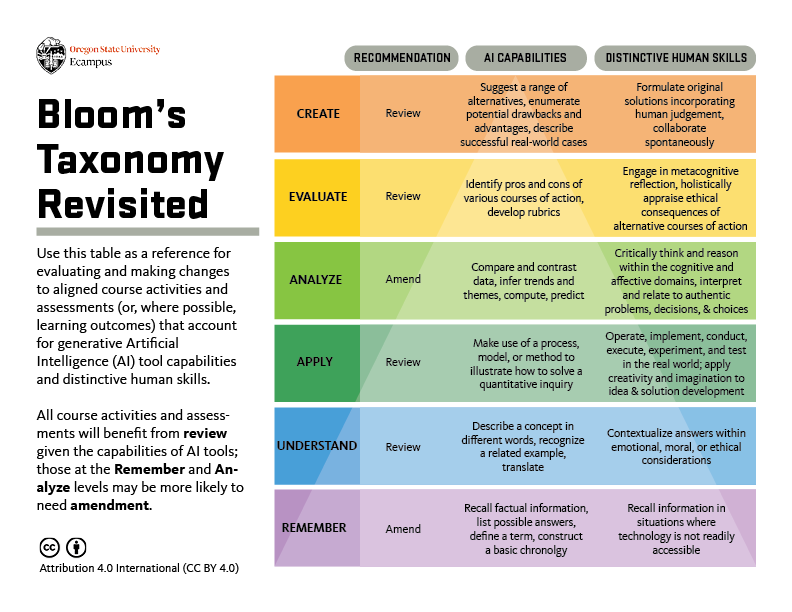
Figure 1: Bloom’s Taxonomy Revisited Version 2.0, Oregon State University
^ back to top
You may consider making slight changes to clarify what human-centred skills you are assessing, as shown in the following examples of analysis-level learning outcomes:
Example: Modifying Learning Outcomes in Light of Generative AI
Pre-modified ExampleLearning outcomes that do not consider GenAI capabilitiesPhilosophyStudents will analyze the similarities and differences between various types of knowledge (empirical, rational, testimony, revelation). MedicineStudents will compare and contrast how promotional health information and resources effectively and accurately present information to patient care. StatisticsStudents will analyze data using exploratory data analysis techniques and statistical modeling methods. | Modified ExampleLearning outcomes that do consider GenAI capabilitiesPhilosophyStudents will critically evaluate and compare types of knowledge (empirical, rational, testimony, revelation) within ethical contexts. MedicineStudents will assess the accuracy, reliability, and relevance of promotional health information and resources, identifying biases and areas for improvement in patient care. StatisticsStudents will apply exploratory data analysis techniques and statistical modeling methods to real-world datasets in statistical computing environments, drawing meaningful conclusions. |
In comparing both learning outcomes, the differences can be subtle, but powerful. For example, in the “Statistics” example above, there is a distinct call out that students will draw meaningful conclusions from data. In doing this, the instructor foregrounds the human-centered skills that are valued in the discipline, regardless of whether they will engage generative AI tools in assessments.
Including Learning Outcomes That Encourage AI literacy
Given that generative AI is an emerging tool, developing AI literacy may be meaningful for students, and an important part of their future skillset and entry into the workforce. By incorporating space for AI literacy skill development, students may be better able to use and critically reflect on generative AI technologies, even if they may not be able to develop AI models themselves (Laupichler et al., 2023: 2). In order to incorporate AI literacy into the course, consider following Universal Design for Learning (UDL) principles by explicitly clarifying how course-level learning outcomes relate to the topic. This approach will help students generate meaning around the course, thereby developing their effort and persistence. Rather than approach AI literacy as something that one either has or lacks, it can be helpful to consider how it relates to different categories of skills. Following Bloom’s Taxonomy, AI competencies can be categorized into four cognition domains, organized from lower to higher order thinking skills. As an instructor, you may consider starting small, asking what discreet AI skills you could meaningfully integrate into the course in the form of a learning outcome, in alignment with the other course-level learning outcomes (Almatrafi et al., 2024):
- Know & understand: Ability to explain the basic functions of AI and how to use AI applications.
- Use & apply: Ability to use and adapt AI tools to achieve an objective.
- Evaluate & create: Ability to analyze the outcomes of AI applications critically.
- Navigate ethically: Ability to understand and judge ethical issues related to generative AI, such as privacy, bias, misinformation, and ethical decision-making.
Example: AI Literacy Learning Outcomes
Philosophy: Students will critically analyze and evaluate the ethical implications raised by generative AI technologies.
Relevant AI literacy skill: evaluate & create, navigate ethically
Medicine: Students will assess the potential benefits and limitations of using generative AI systems for medical diagnosis and treatment planning.
Relevant AI literacy skill: evaluate & create
Statistics: Students will interpret AI model outputs and performance metrics in real-world applications.
Relevant AI literacy skill: use & apply, evaluate & create
^ back to top
Design or Revise Your Assessments
Once you have revisited your course-level learning outcomes, the next step would be to design or revise your assessments, in alignment with the learning outcomes. As you revise your assessments to integrate generative AI as a supplement to learning or to prevent unauthorized use of generative AI, consider the importance of fostering critical thinking, creativity, and the authentic application of knowledge that extends beyond AI-generated content.
The Artificial Intelligence Assessment Scale (AIAS)
The Artificial Intelligence Assessment Scale (AIAS) is designed to guide instructors in integrating generative AI into assessments while maintaining alignment with course learning outcomes and addressing academic integrity considerations.
The Artificial Intelligence Assessment Scale (AIAS)
Note: If your assessment falls under the “No AI” level of the AIAS, students would be prohibited from using AI tools to complete the assessment. At U of T, students would still be permitted to use AI tools as learning aids, such as by summarizing information related to course readings.
To guide your planning on integrating generative AI to any AIAS level beyond “No AI,” consider the following questions to ensure your assessment remains inclusive:
- How can you create opportunities for students to develop relevant generative AI literacy skills? For example, incorporating tutorials, workshops, or activities to help students build necessary generative AI literacy skills for the assessment.
- How can you scaffold the assessment to encourage the critical use of generative AI tools? For example, implementing checkpoints throughout the process to provide timely feedback and support student progress.
- How can you design real-world tasks that require students to apply generative AI tools in conjunction with their own critical thinking and subject knowledge? For example, asking students to use generative AI tools to generate initial ideas or data, then critically analyze, refine, and apply these outputs to solve complex, course-relevant problems.
If You Plan to Prevent Unauthorized Generative AI Use, You May Want To:
- Require citations and check for accuracy. Requiring specific citations and page numbers may discourage students from relying on generative AI.
- Focus assessment materials and prompts on topics local to the course. This approach can help to promote student engagement, and in addition it would be more difficult to generate a relevant answer using generative AI. Also make clear that tests and exams will require mastery of work completed for assignments.
- Add drafts or revise-and-resubmit components to assessments. By scaffolding assessments with iterative feedback, students will be encouraged to revise assignments in direct relation to peer or instructor feedback.
If You Plan to Integrate Generative AI Use, You May Want To:
- Authorize students to use generative AI as an educational tool in specific, constructive ways. Consider allowing students to use AI tools as a study aid and reviewer, to debug code and explain errors, to brainstorm ideas and arguments, or to edit writing.
- Include written reflections on how students’ used or engaged with the tool in assessments. For instance, you may ask “What was your purpose in using GenAI to complete this assignment?” (Dobrin 2023) and incorporate an evaluation of that reflection into the final grade.
- Incorporate citations when GenAI is used. Consider asking students to cite generative AI tools when used, which could include the AI prompt used. You may consider sharing the University of Toronto Libraries resource, “Citing Artificial Intelligence (AI) Generative Tools (including ChatGPT).”
Examples of Using Generative AI as a Supplement to Learning:
- Critique and improve AI-generated outputs. Consider asking students to critically analyze, fact-check, and evaluate outputs generated by AI tools, including texts, equations, or code. You may provide a prompt and the output text, or you could show students how to prompt the tool to generate a response. Individually or with peers, students can then assess and improve the response for accuracy, depth, and nuance. For example, you may ask students to answer: What important knowledge did they learn from the class that the AI missed?; What is a more nuanced or correct answer or explanation, compared to the GenAI output?; What aspects of the writing are compelling, misleading, or redundant?
- AI-assisted problem-solving. For problem-based assessments, you may consider asking students to leverage generative AI tools to generate potential solutions, brainstorm ideas, and receive clarification. You may wish to invite students to use generative AI to write or expand on code or synthesize data sets. From there, you could prompt students to demonstrate their own understanding by evaluating and refining AI-generated content.
- AI-assisted writing. For writing assignments, you may consider allowing students to use generative AI tools to help with ideation, outlining, or drafting. However, you may devote a portion of the evaluation to having them substantially revise and refine the AI-generated content, to reflect their critical thinking and writing skills.
- Adding creative elements to assignments. You may consider inviting students to use generative AI tools to add more creative elements to their work, such as using generators for images that they add to slide presentations, or to include infographics. Students could also use AI text generators to create draft scripts for videos in which they demonstrate key learning outcomes. Harnessing generative AI in this way can provide opportunities for students to demonstrate their learning in different modalities.
Revising Assessments to Reduce Learning Barriers
Regardless of whether you choose to allow the use of generative AI in assessments, you may consider using Universal Design for Learning (UDL) principles to proactively enhance access and build student agency in their learning. This does not eliminate the need for specific academic accommodations for students with disabilities. Rather, this closes the gap between student needs and instructional design, and offers a ramp to better facilitate academic accommodations for students with disabilities. When designing or revising your assessments with generative AI in mind, consider engaging in one or more of the following UDL strategies to reduce learning barriers:
- Design options for various forms of assessments with generative AI. Given that there is no one means of action and expression that is optimal for all learners, you may wish to provide space for assessment choice, including those that involve generative AI-usage and those that do on. For instance, students may be able to show what they know through written submissions or visual representations, while engaging with pertinent tools.
- Scaffold assignments so that students are working towards a final product for submission. Whether or not generative AI is part of the assessment, this effective approach benefits the students’ writing and learning and also creates authentic conditions that are more likely to deter unauthorized use of generative AI.
- Align with real-world tasks. Encourage students to demonstrate their knowledge and skills in a way that is significant, meaningful, and aligned with real-world tasks. Ask real questions that stem from current debates in your discipline, and let students know that you expect engaged critical thinking that is appropriate for the level of your students and your discipline. Encourage speculation based on evidence and reasoning, not just compilation of existing information or expression of unsupported personal opinion.
- Be Explicit about Expectations. Clarify and decode instructions and expectations by providing clear cues and prompts. You may provide rubrics and grading criteria to ensure students know what is expected of them in the assessment, and whether and when generative AI tools can be used. This may also reduce inappropriate or misguided peer-peer communication. See the “week to week” section for further examples on ways to provide clarity and purpose to students about assessments as they are introduced.
^ back to top
Develop a Communication Plan with Students and TAs
Once you have decided on your course-level learning outcomes and assessments, you can determine your course policies and plan how you will communicate them. Your students will have varying levels of knowledge of generative AI, and many will look to you for guidance on what they are and are not allowed to do and how these tools will impact their learning.
The University of Toronto has created sample statements to include in course syllabi and course assignments to help inform students what AI technology is, or is not, allowed in the course. Visit resource on Generative Artificial Intelligence in the Classroom: FAQs to access the most updated sample statements. In addition to providing an explicit course policy statement on generative AI for your syllabus, you may want to intentionally plan how you will share these expectations to students in class and on Quercus. Consider one or more of the following strategies:
- Engage students in discussion about the policy discussions, to explain the rationale and how it relates to course-level learning outcomes.
- Identify best practices for how to use and cite the use of generative AI tools, if they are permitted.
- Identify relevant campus resources for students to support their learning skills development while using generative AI, thereby encouraging academic integrity. Potential student-facing resources that you may add your syllabus include:
- UTSG: Through the Centre for Learning Strategy Support (CLSS), students may book a learning strategy appointment or attend a workshop on effectively preparing for assessments and exams. Through the Writing Centre, students may book one-on-one consultations for developing their writing skills.
- UTM: Through the Student Resource Hub at the Robert Gillespie Academic Skills Centre, students may book a learning strategy or writing support appointment.
- UTSC: Through the Centre for Teaching and Learning, students may book a writing support appointment. Through the Academic Advising and Career Centre, students may book a study-skills peer coaching appointment or attend a related workshop.
- Develop a plan for how you will communicate to your course teaching assistants their roles and responsibilities: How will they evaluate assessments and communicate course policies regarding generative AI use?
Example: GenAI Policy Syllabus Statment
A goal in this course is to teach students how to express their knowledge and skills around [insert course topic], which takes place in in-class interactions, online discussion forums, and in written essays and exams. Generative AI can serve as a useful resource, by providing tutoring support for writing and analysis.
In this course, we will use Microsoft Copilot to engage in critical thinking and writing activities and assessments. Students are expected to use Microsoft Copilot for specific aspects of writing assignments and must include with every assignment a short reflection on how they made use of the generative artificial intelligence tool in the development of their assignment. No other generative AI technologies are allowed to be used for assessments in this course.
Students may not use artificial intelligence tools when taking tests in this course, but students may use generative AI tools for other assignments as indicated. If you have any questions about the use of AI applications for course work, please speak with the instructor
^ back to top
Engaging Your Students
Table of Contents
- Communicate with Students about Expectations Regarding GenAI Use
- Demonstrate How to Responsibly use GenAI Tools
- Communicate with TAs about Expectations Regarding GenAI Use
- As Assessments are Introduced, Outline Their Rationale and Procedures
- Use GenAI to Support Student Engagement and AI Literacy
As you move through the weeks of the course, it is essential to maintain open communication with students about generative AI. This section will outline how to introduce assessments and integrate discussions about AI on a weekly basis, helping students understand the purpose of assessments and whether and how they are permitted to use AI tools. By checking in and communicating regularly with students, they will be less likely to seek out generative AI for (mis)information.
Communicate with Students about Expectations Regarding GenAI Use
The first day is an important opportunity to model how you hope and expect that classes will proceed throughout the course. Building a sense of community through active participation around course policies will help set a tone that supports responsible use of generative AI.
Following Universal Design for Learning (UDL), you may consider providing options for recruiting attention and engagement, thereby optimizing what is relevant, valuable, and meaningful for each learner. In consideration of this, you may want to explicitly communicate with your students about generative AI expectations, drawing on one or more of the following strategies:
- Create a community agreement. Ask students to collaboratively reach consensus about generative AI in course activities and assessments. See the CTSI resource for more suggestions on building these community agreements.
- Explain what your policy is and why. Rather than reiterate the language of the policy statement on your syllabus, you may wish to elaborate on what reasons you chose this policy. How does that policy encourage students to effectively reach the learning outcomes of the course?
- Facilitate debates. Arrange a classroom debate about generative AI as it relates to your course topics and/or themes.
- Create space for discussion and reflection around generative AI policies and expectations. Prior to explicitly discussing the policies, you may wish to create space for a broader discussion on learning and generative AI. Active learning activities like low-stakes writing, reflective writing, think-pair-share, and jigsaws can be effective ways of generating and recording ideas.
Example: GenAI Policy Discussion Prompts
To initiate collaborative reflection around generative AI policies and expectations, the first week of class may begin with an ungraded discussion exercise, centred around the following guiding questions:
- Have you used generative AI? For what purposes?
- What is your familiarity level with generative AI tools?
- What is our course policy on generative AI use, and what do you think is the reasoning behind it, given the course learning outcomes?
- What is an example of when you were impressed with/disappointed in output from generative AI?
^ back to top
Demonstrate how to Responsibly use GenAI Tools
If you are choosing to encourage or allow students to use generative AI, you may wish to begin the course with a demonstration of how to use relevant institutionally approved tools. While the interactive, chat functions of generative AI can be engaging for students, making the most of these tools can require time and patience for both instructors and students. In line with Universal Design for Learning (UDL), students may benefit from there being options for how they may engage in information processing and visualization.
Given that the use of generative AI tools may be relatively new for some, and that all learners have diverse abilities in summarizing and categorizing information, you may wish to consider one or more of the following:
- Offer step-by-step demonstration of prompt writing. Rather than only offer a general introduction to generative AI, you may wish to model how students could responsibly use relevant tools for upcoming assessments in the course. You may want to spend focused time on showing what makes an effective prompt. A prompt is natural language text describing the task that an AI agent or chatbot should perform. Prompt writing (sometimes known as prompt engineering) is the process of structuring an effective prompt that can be interpreted and understood by the AI system. To learn more on prompt writing, see our Tool Guide under “How can I prompt with Copilot?.”
- Create collaborative space for experimentation and feedback. Students have varying levels of experience with generative AI tools, and the first class can be a great space to gauge their level of familiarity. In addition to providing a demonstration, you may wish to encourage your students to share helpful tips and reflections as they independently experiment with the tools.
- Draw attention to learning resources that support the responsible use of generative AI. When students know what resources are available to them, they will be more likely to find ways to overcome academic challenges. Even if it is mentioned on the syllabus, you may wish to model to students how they may connect with relevant academic supports across the University of Toronto – including writing centres and learning strategists. By doing this, students may be more likely to responsibly use any permitted generative AI tools.
Example: Demonstration of Microsoft Copilot
Currently, Microsoft Copilot is the recommended generative AI tool to use at U of T. When a user signs in using University credentials, Microsoft Copilot conforms to U of T’s privacy and security standards (i.e., does not share any data with Microsoft or any other company).
To encourage students to use Copilot responsibly, you may provide a step-by-step demonstration in the first class:
- Step 1: Demonstrate the full sign-in process in protected mode, and how to verify that you are in protected mode.
- Step 2: Demonstrate how to prompt in Copilot, using examples that are relevant to course assessments and activities.
- Step 3: Provide examples of how to critically analyze prompt output.
- Step 4: Create space for students to collaborate and experiment using the tool
- Step 5: End the demonstration by specifying at what stage(s) in assignments and activities students will be permitted to use Copilot.
For information on other approved tools, please visit CTSI’s Generative AI Tools.
^ back to top
Communicate with TAs about your Expectations regarding their GenAI Use
When connecting with your course teaching assistants (TAs) during the initial course meeting, it is good practice to communicate whether and how your course will engage or limit the use of generative AI. To clarify TAs’ roles and responsibilities, as well as your expectations, you may wish to consider discussing one or more of the following topics:
- Grading and rubrics. Communicate with teaching assistants whether and how grading rubrics will be adjusted to account for generative AI capacities, so that human skills are being prioritized for evaluation. Hear from TAs about their prior experiences in grading assessments since generative AI tools have become more available; their insights may be a useful resource as you consider the grading protocol of your course.
- Student communication plan. Provide suggestions to teaching assistants on how they should communicate with students about course generative AI policies and recommended practices.
- Tools training. If generative AI tools are part of the course, provide training to teaching assistants about how to use the tools. Consider showing them how they may model the responsive use of generative AI tools, if their contract involves student interaction in tutorials, labs, or office hours.
- Check-in plan. Discuss a plan for course check-ins, so that there is an open line of communication. By doing this, teaching assistants will have a clear idea of how they may raise any questions or concerns that come up regarding generative AI expectations, protocol, and policies.
Example: Instructor-TA Team Meeting Plan
During the initial instructor-TA team meeting, the instructor and teaching assistants will review and sign the Description of Duties and Allocation of Hours (DDAH) forms. This is a good opportunity to clarify and discuss the responsibilities and communication protocol for each teaching assistant.
The instructor will organize the conversation around the following questions:
- How should TAs handle student questions related to use of generative AI in the course?
- How do assessments address the potential for generative AI use?
- What is the protocol if a TA is concerned about a student using an unauthorized generative AI tool in an assessment?
- How can TAs encourage student participation in discussions related to generative AI and course policies?
- What potential challenges might arise due to the course size and generative AI use? How can TAs and the instructor collaborate to address these challenges effectively?
^ back to top
As Assessments are Introduced, Outline their Rationale and Procedures
Since generative AI is new technology and its allowed uses will vary across courses, students will require clear guidelines, reiterated throughout the course. The following strategies will ensure that your communication about assessments is accessible to all learners, aligning with a Universal Design for Learning (UDL) approach. Consider doing one or more of the following:
- Communicate the value of the assessments and what students can gain from completing them in relation to course-level learning outcomes. If generative AI tools play a role in completing the assessments, you may show students again how to engage with them and why. You may alternatively encourage your teaching assistants to take on that role, if they are running tutorials.
- Review assignment instructions in class and provide an opportunity for questions. Clearly explain the extent of allowed AI use for the assignment, and engage students in a conversation about why you chose to encourage or discourage the use of generative AI, and how generative AI may or may not help them with the assignment.
- Include an integrity statement for students to complete when submitting their assignments, affirming their adherence to the course’s Generative AI policy.
- Share a “ready to submit” summary assignment sheet or checklist to guide and motivate students through the learning process, so that they know what to submit and when they are done (Bowen and Watson, 2024). Given the choice between harder and easier work, students will be more likely to use generative AI responsibly if they understand the value of the added discomfort. Consider addressing the following questions on the assignment sheet or checklist:
- Purpose: What skills or knowledge will I gain? How will I be able to use this?
- Task: What needs to be submitted? Is there a recommended process? When is this due? Where can I do this work and with whom?
- Criteria: What are the parts? How will I know what’s expected?
- Process: Most assignments require processes that are more obvious to faculty than to students; specify when and which AI might be a useful tool and how it may enhance learning.
Example: Assignment Checklist-Problem Set
This assignment will take roughly 75 minutes. In order to complete the assignment, undertake the following sequence of steps:
- 10 minutes: Read the chapter quickly and take notes on paper.
- 20 minutes: Try all the first 15 problems on your own. Skip any problems that get you stuck.
- 10 minutes: Go back and work through the problems in detail. If you get confused, use Microsoft Copilot to get help.
- 5 minutes: Take a problem you are confident in sand ask Microsoft Copilot for a solution. Whose answer is better?
- 15 minutes: Check your work and finish
- 5 minutes: Rewrite your notes about the chapter. What have you learned? Make a mind map connecting the key concepts.
Adapted from: Teaching with AI (Bowen and Watson 2024, 195)
^ back to top
Use GenAI to Support Student Engagement and AI Literacy
With intentional planning on the part of the instructor, generative AI may offer novel opportunities for personalized practice, tailored to students’ needs.
While students may have used generative AI, they may not be familiar with best practices for using AI tools to enhance knowledge retention and critical thinking. If your course has exam components or introduces students to new conceptual material, consider adapting and sharing sample prompts from CTSI’s “AI Virtual Tutor – Effective Prompting Strategies” resource.
Following Universal Design for Learning (UDL), you may wish to offer multiple means of engagement; by varying forms of involvement and interaction, students may more likely be motivated to apply their knowledge. To extend or transform in-class engagement, you may consider using generative AI for one or more of the following:
- Learn through tutoring. You may use generative AI tools to engage students in metacognitive reflection, whereby they identify gaps in their knowledge, consider alternative perspectives, and establish connections within complex bodies of information. This may encourage students to self-regulate, sustain effort, be goal-directed, and monitor their progress in learning.
- Learn through simulations. You may wish to create AI-based scenarios to serve as controlled spaces for applying knowledge in a low-stakes context. In role playing, the student may assume the identity of someone else; in goal playing, the student maintains their identity while applying their knowledge and skills. In these spaces, the AI may play the role of mentor while also creating the narrative set-up.
- Learn through critique. AI can provide students with multiple “peers”, prompting the student to help the “AI student” understand class material. For instance, students can critique whether an AI-generated scenario applied a course concept correctly, thereby giving space to demonstrate their knowledge.
- Provide multiple examples and explanations. Generative AI I tools can be used to generate a wide variety of examples related to a given topic, to model and problematize a thought process, and to offer alternative explanations. In all these cases, you may consider creating discussion space to critique the AI-generated output, thereby supporting students’ analytic skill development.
- Gather formative feedback on generative AI use in the class. It can be useful to collect mid-term feedback on the course, to gauge and respond to student experiences with generative AI. These evaluations may be used to make adjustments to the course that will affect the rest of the semester. For instance, you may ask students to submit exit-ticket responses at the end of a class, or one-minute papers, where students provide responses to class activities or assignments (see Angelo & Cross, 1993).
Adapted from: Instructors as Innovators: A future-focused approach to new AI learning opportunities, with prompts,
Mollick and Mollick, 2024.
Example: Think-Pair-Copilot-Pair-Share
Think-Pair-Share (TPS) is a cooperative structure in which partners privately think about a question (or issue, situation, idea, etc.), then discuss their responses with one another. By incorporating generative AI into the activity, students will be exposed to additional perspectives to critically engage with.
- Think: Introduce the topic and encourage students to brainstorm as many ideas as possible, without the use of generative AI
- Pair: Have students pair up with a partner to share their thoughts
- Copilot: Ask students to individually conduct a search on Copilot to find more information on the topic, evaluating its output
- Pair: Have students pair up again with their partner to evaluate the examples and facts they found
- Share: Students share what they found with the whole class
Adapted from: Dillard, 2022
^ back to top
Wrapping Up Your Course
Table of Contents
- Collect Student Reflections and Feedback
- Reflect and Plan Your Next Steps in Teaching
The end of the term is a valuable time to learn from students’ experiences, using those insights to guide how you will move forward with future iterations of the course. You may consider connecting with your students and TAs around how the course engagement with generative AI.
Collect Student Reflections and Feedback
In addition to collecting mid-term course feedback, you may also consider creating space for informal feedback and discussion at the end of the term. By doing this, you can directly learn from students and teaching assistants about how you may adjust the course for future teaching.
To collect feedback and encourage reflection on generative AI’s application to teaching, you may consider one or more of the following:
Reflective writing activities about generative AI
- Incorporate an assignment or optional end-of-term activity, where students share their experiences and challenges using generative AI to support their learning in the course.
- To guide students’ reflection, consider offering prompts, such as:
- How did you use generative AI tools in the course? What were the benefits and challenges?
- What strategies did you employ to effectively use the output of these tools?
- What suggestions would you give to a student taking the same course next semester, so that they get the most of using these tools?
Reflective activities using generative AI
- Moving a step further than a conventional reflective writing activity, consider inviting students to use generative AI to dialogue with their thoughts.
- For instance, you may provide prompts to students, so that they have a “conversation” with Copilot, where it asks progressive questions and feedback. From there, you may invite students to critique and expand on the summaries from Copilot, strengthening their AI literacy.
Gather feedback from teaching assistants
- Since teaching assistants often work directly with students, it will be valuable to gather their feedback from the semester on how course activities and assessments—including those that engaged generative AI—impacted student learning.
- Consider using anonymous feedback methods, so that TAs may comfortably share their concerns. If having a conversation, consider preparing the meeting with guiding questions about their experiences, strategies, and suggestions for improvement.
Example: Dialoguing with Copilot for Course Reflection
Activity learning outcome: Students will evaluate and reflect on the use of Microsoft Copilot throughout the entire semester to support their course-level learning goals.
5 minutes: Personalize and insert one or more versions of the following prompt into Microsoft Copilot, so that you can have a conversation about your experiences and challenges in the course:
You are a helpful mentor, guiding me, an undergraduate student in [insert course name] to reflect on benefits, challenges, and lingering questions from a semester-long course, where generative AI tools were used to encourage critical thinking and idea generation. As a helpful mentor, you will dialogue with me (the student), asking thoughtful questions to help me identify the benefits and challenges that I faced using generative AI as a learning tool, as well as any suggestions I have for the instructor and any future students taking the course. You will ask me one question at a time, and you will not ask a further question until I provide a response. You will also ask follow-up questions when my answers are unclear.
20 minutes: Interact with Microsoft Copilot through a back-and-forth dialogue. Save a copy of the dialogue, to be submitted to the instructor.
15 minutes: End the activity by writing a short reflection on the benefits, challenges, and lingering questions that come up, based on your use of generative AI as a learning tool for [insert course topic].
^ back to top
Reflect and Plan Your Next Steps in Teaching
Student evaluations and informal feedback can serve as very useful resources for your long-term development as an instructor. By drawing on these responses, as well as you own observations, you can develop a plan for your next steps.
There are many ways that you can structure your plan for refining your teaching with generative AI for future courses. As you organize informal feedback, formal evaluations, and your own observations, you may consider following Universal Design for Learning (UDL) Plus-One Approach: What moments in the course were “pinch points,” where your incorporation of generative AI didn’t go the way you anticipated? By starting with addressing these moments, you will move towards reducing the most significant barriers and finding the most important areas of your course where you can address learning variability. You may consider reflecting on one or more of the following topics:
- Assessing student learning. Has there been any notable changes in student engagement or learning since incorporating generative AI into my teaching?
- Refining assessments. Which assessments worked well, and which should I focus on redesigning, so that students’ skill-building is prioritized?
- Evaluating teaching strategies. Which strategies have been most helpful in helping students to critically and responsibly engage with course material and the use of generative AI in your discipline?
- Policies and guidelines. What modifications can I make, to further address ethical and academic integrity considerations?
- Share Ideas. How may I engage with colleagues in my discipline and across U of T? How may I share approaches that integrate best practices in assignment and assessment design in the context of using or avoiding the use of generative AI?
- Professional development. By leveraging generative AI, what new skills have I acquired, and what new areas I have identified?
Resource: CTSI Consultations
As you conclude a course, reflecting on your experiences and student feedback can guide your next steps as an instructor. In addition to teaching dossier reviews, CTSI offers consultations to instructors in areas related to teaching and generative AI:
- Teaching strategies in the context of generative AI
- Enhancing student engagement through generative AI tools
- Course design, development, and review
- Revising learning outcomes to address AI literacy
- Using generative AI educational technology such as Microsoft Copilot for in-person, online, and hybrid classrooms
- Interpreting course evaluation data
- Research on pedagogical topics (Scholarship of Teaching and Learning or SoTL) related to generative AI and learning
^ back to top
Teaching with GenAI v.2
This resource provides guides, explanations, and ideas to help you plan for and/or integrate generative AI into your courses. Visit U of T Teaching Examples to see how instructors have integrated AI use into course design across disciplines.
Navigating Generative AI: Six Suggestions for Every Instructor

The following suggestions have been prepared by the Centre for Teaching Support & Innovation based on engagement with U of T instructors and current recommended practice. As you consider the impacts of generative AI on your teaching, you may wish to respond by:
- Clarifying expectations with your students by discussing your expectations and providing guidelines around using generative AI tools in your course. Add clear language to your syllabus and assignments regarding allowable use.
- Preparing for a conversation with your students about responsible use of generative AI for learning in relation to your course and discipline.
- Rethinking both learning outcomes and corresponding assessments with the potential impacts of use by students in mind. Take time for critical consideration of teaching with generative AI.
- Talking to your TAs about expectations for use of generative AI in relation to their role and to your expectations for appropriate use/non-use by students in the course. Consider sharing TATP’s TA-focused resource on generative AI with your TAs.
- Familiarizing yourself with tools that align with the University’s privacy and data protections. If leveraging the capability of generative AI, you can use Microsoft Copilot in Protected Mode to protect your data and privacy.
- Exploring applications of generative AI tools and their outputs to gain a better understanding of their capabilities and limitations. There are a number of workshops and resources available through the Centre for Teaching Support & Innovation.
For more information:
https://ai.utoronto.ca/faculty/
This content is available in several formats for download for use in a range of instructor support contexts: PDF Format, Word Format, PPT Format.
Proactive Strategies to Address Unauthorized GenAI Use
Instructors can promote academic integrity through the ethical and effective design, delivery, and assessment strategies (Eaton, 2024). In the context of generative AI (GenAI), consider:
Fostering Honesty via Course Design
- Clear syllabus statements: Explicitly define authorized/unauthorized GenAI use for your course. If you need language about GenAI for your syllabi, U of T has examples available.
- Purposeful assignment design: Create meaningful assessments that encourage students to focus on the process of learning, prioritizing critical thinking, reflection, and classroom-specific content; see CTSI’s Teaching with Generative AI.
- Scaffolded assignments: Break projects into smaller components with checkpoints to identify and assist struggling students early. This encourages students to focus on the learning process, rather than the final outcome; see CTSI’s Teaching Resources.
- Reflections on AI use: Ask students to explain if and how they integrated AI tools into their workflow. If none were used, have students describe their research, analysis, and creative process. This metacognitive practice can build intrinsic motivation.
- For a practical example of assessment design that uses scaffolding, reflection, and course-specific application to emphasize and evaluate students’ original thinking, see First-Year Drama Essay Assignment (Simon Fraser University).
Educating Students on Best Practices
- Clarify expectations: Collaborate with your TAs to provide ongoing discussions of appropriate vs. inappropriate uses of AI tools; see TATP’s Teaching with GenAI.
- Model proper citation: Demonstrate how to properly cite AI when permitted on an assessment; see UTL resources on citing AI, image research, and copyright considerations.
- Emphasize the value of original thought: Encourage students to recognize that their unique voice, creativity, and critical thinking are invaluable and irreplaceable when completing assessments, whether they be writing, coding, or multimedia projects.
- Discuss AI limitations and risks: Explain the limitations of GenAI (hallucinations, fabricated references), emphasizing the importance of fact-checking and digital literacy.
Identifying Possible Misconduct Cases
- Before issues arise, familiarize yourself with traditional detection methods (e.g. the student cannot explain their work) and the standard academic misconduct process.
- AI-detection software programs are unreliable and biased against non-native English writers (Elkhatat et al., 2023; Liang et al., 2023; Saha and Feizi, 2025). U of T does not support the use of AI-detection tools; see the OVPIUE’s FAQ on Generative AI.
- Personal intuition that a text is AI-generated has been shown to be inconsistent, even when evaluators are experienced with GenAI and confident in their abilities (Waltzer et al., 2024).
- For further guidance, contact the head of your academic unit.
This content is available for download for use in a range of instructor support contexts: PDF Format, Word Format, PPT Format.
Planning Your Course
Table of Contents
- Develop or Revise Your Learning Outcomes
- Design or Revise Your Assessments
- Develop a Communication Plan with Students and TAs
This section offers considerations on how to intentionally begin course planning with generative AI in mind. You may want to revise course-level learning outcomes and assessments, as well as develop a communication plan with students and teaching assistants (TAs).
Develop or Revise Your Learning Outcomes
In light of how students could use generative AI, you may want to revise the learning outcomes from previous iterations of the course. Learning outcomes are statements that describe the knowledge or skills students should acquire by the end of a particular class, course, or program. Rather than be unchanging, learning outcomes may shift to address the larger context in your discipline: the requirements of follow-up courses, potential student career paths post-graduation, and emergent digital literacy skills needed for future readiness, where AI will be increasingly used as a partner and collaborator.
It is good practice to specify learning outcomes that are meaningful to students’ post-educational goals and overall skill development. This may help to stimulate student interest and maintain motivation across the course. To guide your decision-making process on whether and how you will engage with generative AI, you may reflect on one or more of the following questions:
- What human-centered skills do I want my students to develop, and how may I articulate them in the form of a learning outcome?
- Can students’ use of generative AI tools align with my course learning outcomes and teaching philosophy and if so, how?
- How may I leverage generative AI tools to facilitate deeper thinking?
- What digital literacy skills do I want my students to develop?
Modifying learning outcomes to foreground human-centred skills
While learning outcomes vary across courses, there are some cross-disciplinary cognitive skills that you may consider relevant to your students’ development. According to Bloom’s Revised Taxonomy of Active Verbs, an educational framework for categorizing learning objectives, there are six levels of skill and complexity that instructors may measure in relation to student learning. “Bloom’s Taxonomy Revisited” (see Figure 1), created at Oregan State University, offers a framework that reconsiders how to define each of the six levels of learning in your disciplinary context, given the capabilities of AI tools. For instance, in the “analysis” level, students critically examine and break information into parts by identifying motives, causes, and relationships. Generative AI, however, is currently proficient in many analysis-related tasks, including comparing and contrasting and inferring themes. Given the analytic capabilities of generative AI, you may want to update how you frame learning outcomes at this level, so that you are pointing to human-centered skills that do not posit an overreliance on AI tools.
To verify whether your course-level learning outcomes are measuring distinctive human skills, you may wish to reflect on one or more of the following questions:
- Does the learning outcome encourage students to interpret and relate to authentic problems, decisions, and choices?
- Does the learning outcome encourage students to engage higher-order thinking skills (critical analysis, synthesis, evaluation), which generative AI cannot fully engage in?
- Does the learning outcome encourage the development of robust conceptual knowledge, i.e., the “why” behind the “what”?
Figure 1: Bloom’s Taxonomy Revisited Version 2.0, Oregon State University
You may consider making slight changes to clarify and foreground what distinctive human skills you are assessing, as shown in the following examples of analysis-level learning outcomes:
Example: Modifying Learning Outcomes
Pre-modified Example:Learning outcomes that do not address distinctive human skills in relation to generative AI capabilities Philosophy: Medicine: | Modified Example:Learning outcomes that address distinctive human skills in relation to generative AI capabilities Philosophy: Medicine: |
In comparing both learning outcomes, the differences can be subtle, but powerful. For example, in the “Statistics” example above, there is a distinct call out that students will draw meaningful conclusions from data. In doing this, the instructor foregrounds the human-centered skills that are valued in the discipline, regardless of whether they will engage generative AI tools in assessments.
Including learning outcomes that encourage AI literacy
Given that generative AI is an emerging tool, developing AI literacy may be meaningful for students, and an important part of their future skillset and entry into the workforce. By incorporating space for AI literacy skill development, students may be better able to use and critically reflect on generative AI technologies, even if they may not be able to develop AI models themselves (Laupichler et al., 2023: 2). In order to incorporate AI literacy into the course, consider following Universal Design for Learning (UDL) principles by explicitly clarifying how course-level learning outcomes relate to the topic. This approach will help students generate meaning around the course, thereby developing their effort and persistence. Rather than approach AI literacy as something that one either has or lacks, it can be helpful to consider how it relates to different categories of skills. Following Bloom’s Taxonomy, AI competencies can be categorized into four cognition domains, organized from lower to higher order thinking skills. As an instructor, you may consider starting small, asking what discreet AI skills you could meaningfully integrate into the course in the form of a learning outcome, in alignment with the other course-level learning outcomes (Almatrafi et al., 2024):
- Know & understand: Ability to explain the basic functions of AI and how to use AI applications.
- Use & apply: Ability to use and adapt AI tools to achieve an objective.
- Evaluate & create: Ability to analyze the outcomes of AI applications critically.
- Navigate ethically: Ability to understand and judge ethical issues related to generative AI, such as privacy, bias, misinformation, and ethical decision-making.
Example: AI Literacy Learning Outcomes
Philosophy: Students will critically analyze and evaluate the ethical implications raised by generative AI technologies.
Relevant AI literacy skill: evaluate & create, navigate ethically
Medicine: Students will assess the potential benefits and limitations of using generative AI systems for medical diagnosis and treatment planning.
Relevant AI literacy skill: evaluate & create
Statistics: Students will interpret AI model outputs and performance metrics in real-world applications.
Relevant AI literacy skill: use & apply, evaluate & create
Design or Revise Your Assessments
Once you have revisited your course-level learning outcomes, the next step would be to design or revise your assessments, in alignment with the learning outcomes. As you revise your assessments to integrate generative AI as a supplement to learning or to prevent unauthorized use of generative AI, consider the importance of fostering critical thinking, creativity, and the authentic application of knowledge that extends beyond AI-generated content.
The Artificial Intelligence Assessment Scale (AIAS)
The Artificial Intelligence Assessment Scale (AIAS) is designed to guide instructors in integrating generative AI into assessments while maintaining alignment with course learning outcomes and addressing academic integrity considerations.
The Artificial Intelligence Assessment Scale (AIAS)
Note: If your assessment falls under the “No AI” level of the AIAS, students would be prohibited from using AI tools to complete the assessment. At U of T, students would still be permitted to use AI tools as learning aids, such as by summarizing information related to course readings.
To guide your planning on integrating generative AI to any AIAS level beyond “No AI,” consider the following questions to ensure your assessment remains inclusive:
- How can you create opportunities for students to develop relevant generative AI literacy skills? For example, incorporating tutorials, workshops, or activities to help students build necessary generative AI literacy skills for the assessment.
- How can you scaffold the assessment to encourage the critical use of generative AI tools? For example, implementing checkpoints throughout the process to provide timely feedback and support student progress.
- How can you design real-world tasks that require students to apply generative AI tools in conjunction with their own critical thinking and subject knowledge? For example, asking students to use generative AI tools to generate initial ideas or data, then critically analyze, refine, and apply these outputs to solve complex, course-relevant problems.
If you plan to prevent unauthorized generative AI use, you may want to:
- Require citations and check for accuracy. Requiring specific citations and page numbers may discourage students from relying on generative AI.
- Focus assessment materials and prompts on topics local to the course. This approach can help to promote student engagement, and in addition it would be more difficult to generate a relevant answer using generative AI. Also make clear that tests and exams will require mastery of work completed for assignments.
- Add drafts or revise-and-resubmit components to assessments. By scaffolding assessments with iterative feedback, students will be encouraged to revise assignments in direct relation to peer or instructor feedback.
Example: Health Promotion Assignment
Assignment learning outcome: Students will assess the accuracy, reliability, and relevance of promotional health information and resources.
To discourage the use of generative AI, students will be asked to:
- Specifically engage with copyrighted promotional health information from lectures 3 and 4 in order to analyze the material’s accuracy, reliability, and relevance to patient care.
- Provide citations in APA format with page numbers in order to demonstrate how they developed their analysis.
- Undertake two rounds of peer-reviewed feedback prior to the deadline.
If you plan to integrate generative AI use, you may want to:
- Authorize students to use generative AI as an educational tool in specific, constructive ways. Consider allowing students to use AI tools as a study aid and reviewer, to debug code and explain errors, to brainstorm ideas and arguments, or to edit writing.
- Include written reflections on how students’ used or engaged with the tool in assessments. For instance, you may ask “What was your purpose in using GenAI to complete this assignment?” (Dobrin 2023) and incorporate an evaluation of that reflection into the final grade.
- Incorporate citations when GenAI is used. Consider asking students to cite generative AI tools when used, which could include the AI prompt used. You may consider sharing the University of Toronto Libraries resource, “Citing Artificial Intelligence (AI) Generative Tools (including ChatGPT).”
Examples of using generative AI as a supplement to learning:
- Critique and improve AI-generated outputs. Consider asking students to critically analyze, fact-check, and evaluate outputs generated by AI tools, including texts, equations, or code. You may provide a prompt and the output text, or you could show students how to prompt the tool to generate a response. Individually or with peers, students can then assess and improve the response for accuracy, depth, and nuance. For example, you may ask students to answer: What important knowledge did they learn from the class that the AI missed?; What is a more nuanced or correct answer or explanation, compared to the GenAI output?; What aspects of the writing are compelling, misleading, or redundant?
- AI-assisted problem-solving. For problem-based assessments, you may consider asking students to leverage generative AI tools to generate potential solutions, brainstorm ideas, and receive clarification. You may wish to invite students to use generative AI to write or expand on code or synthesize data sets. From there, you could prompt students to demonstrate their own understanding by evaluating and refining AI-generated content.
- AI-assisted writing. For writing assignments, you may consider allowing students to use generative AI tools to help with ideation, outlining, or drafting. However, you may devote a portion of the evaluation to having them substantially revise and refine the AI-generated content, to reflect their critical thinking and writing skills.
- Adding creative elements to assignments. You may consider inviting students to use generative AI tools to add more creative elements to their work, such as using generators for images that they add to slide presentations, or to include infographics. Students could also use AI text generators to create draft scripts for videos in which they demonstrate key learning outcomes. Harnessing generative AI in this way can provide opportunities for students to demonstrate their learning in different modalities.
Example: Data Analysis Assignment
Assessment learning outcome: Students will visualize and interpret data using appropriate statistical methods.
To encourage Generative AI use, students will be asked to:
- Draft initial code for data analysis and visualization, using Copilot for assistance.
- Identify potential errors or issues with the coding assistance received from Copilot, and suggest possible solutions, alternative approaches, or areas to investigate.
- Reflect on how they engaged with generative AI tools, what benefits or challenges came up, and how this use augemented their problem-solving skills.
Revising assessments to reduce learning barriers
Regardless of whether you choose to allow the use of generative AI in assessments, you may consider using Universal Design for Learning (UDL) principles to proactively enhance access and build student agency in their learning. This does not eliminate the need for specific academic accommodations for students with disabilities. Rather, this closes the gap between student needs and instructional design, and offers a ramp to better facilitate academic accommodations for students with disabilities. When designing or revising your assessments with generative AI in mind, consider engaging in one or more of the following UDL strategies to reduce learning barriers:
- Design options for various forms of assessments with generative AI. Given that there is no one means of action and expression that is optimal for all learners, you may wish to provide space for assessment choice, including those that involve generative AI-usage and those that do on. For instance, students may be able to show what they know through written submissions or visual representations, while engaging with pertinent tools.
- Scaffold assignments so that students are working towards a final product for submission. Whether or not generative AI is part of the assessment, this effective approach benefits the students’ writing and learning and also creates authentic conditions that are more likely to deter unauthorized use of generative AI.
- Align with real-world tasks. Encourage students to demonstrate their knowledge and skills in a way that is significant, meaningful, and aligned with real-world tasks. Ask real questions that stem from current debates in your discipline, and let students know that you expect engaged critical thinking that is appropriate for the level of your students and your discipline. Encourage speculation based on evidence and reasoning, not just compilation of existing information or expression of unsupported personal opinion.
- Be Explicit about Expectations. Clarify and decode instructions and expectations by providing clear cues and prompts. You may provide rubrics and grading criteria to ensure students know what is expected of them in the assessment, and whether and when generative AI tools can be used. This may also reduce inappropriate or misguided peer-peer communication. See the “week to week” section for further examples on ways to provide clarity and purpose to students about assessments as they are introduced.
Develop a Communication Plan with Students and TAs
Once you have decided on your course-level learning outcomes and assessments, you can determine your course policies and plan how you will communicate them. Your students will have varying levels of knowledge of generative AI, and many will look to you for guidance on what they are and are not allowed to do and how these tools will impact their learning.
The University of Toronto has created sample statements to include in course syllabi and course assignments to help inform students what AI technology is, or is not, allowed in the course. Visit resource on Generative Artificial Intelligence in the Classroom: FAQs to access the most updated sample statements. In addition to providing an explicit course policy statement on generative AI for your syllabus, you may want to intentionally plan how you will share these expectations to students in class and on Quercus. Consider one or more of the following strategies:
- Engage students in discussion about the policy discussions, to explain the rationale and how it relates to course-level learning outcomes.
- Identify best practices for how to use and cite the use of generative AI tools, if they are permitted.
- Identify relevant campus resources for students to support their learning skills development while using generative AI, thereby encouraging academic integrity. Potential student-facing resources that you may add your syllabus include:
- UTSG: Through the Centre for Learning Strategy Support (CLSS), students may book a learning strategy appointment or attend a workshop on effectively preparing for assessments and exams. Through the Writing Centre, students may book one-on-one consultations for developing their writing skills.
- UTM: Through the Student Resource Hub at the Robert Gillespie Academic Skills Centre, students may book a learning strategy or writing support appointment.
- UTSC: Through the Centre for Teaching and Learning, students may book a writing support appointment. Through the Academic Advising and Career Centre, students may book a study-skills peer coaching appointment or attend a related workshop.
- Develop a plan for how you will communicate to your course teaching assistants their roles and responsibilities: How will they evaluate assessments and communicate course policies regarding generative AI use?
Example: GenAI Policy Syllabus Statement
A goal in this course is to teach students how to express their knowledge and skills around [insert course topic], which takes place in in-class interactions, online discussion forums, and in written essays and exams. Generative AI can serve as a useful resource for students, by providing tutoring support for writing and analysis.
In this course, we will use Microsoft Copilot to engage in critical thinking and writing activities and assessments. Students are expected to use Microsoft Copilot for specific aspects of writing assignments and must include with every assignment a short reflection on how they made use of the generative artificial intelligence tool in the development of their assignment. No other generative AI technologies are allowed to be used for assessments in this course.
Students may not use artificial intelligence tools when taking tests in this course, but students may use generative AI tools for other assignments as indicated. If you have any questions about the use of AI applications for course work, please speak with the instructor
Engaging Your Students
Table of Contents
- Communicate with Students about Expectations Regarding GenAI Use
- Demonstrate How to Responsibly use GenAI Tools
- Communicate with TAs about Expectations Regarding GenAI Use
- As Assessments are Introduced, Outline Their Rationale and Procedures
- Use GenAI to Support Student Engagement and AI Literacy
As you move through the weeks of the course, it is essential to maintain open communication with students about generative AI. This section will outline how to introduce assessments and integrate discussions about AI on a weekly basis, helping students understand the purpose of assessments and whether and how they are permitted to use AI tools. By checking in and communicating regularly with students, they will be less likely to seek out generative AI for (mis)information.
Communicate with Students about Expectations Regarding GenAI Use
The first day is an important opportunity to model how you hope and expect that classes will proceed throughout the course. Building a sense of community through active participation around course policies will help set a tone that supports responsible use of generative AI.
Following Universal Design for Learning (UDL), you may consider providing options for recruiting attention and engagement, thereby optimizing what is relevant, valuable, and meaningful for each learner. In consideration of this, you may want to explicitly communicate with your students about generative AI expectations, drawing on one or more of the following strategies:
- Create a community agreement. Ask students to collaboratively reach consensus about generative AI in course activities and assessments. See the CTSI resource for more suggestions on building these community agreements.
- Explain what your policy is and why. Rather than reiterate the language of the policy statement on your syllabus, you may wish to elaborate on what reasons you chose this policy. How does that policy encourage students to effectively reach the learning outcomes of the course?
- Facilitate debates. Arrange a classroom debate about generative AI as it relates to your course topics and/or themes.
- Create space for discussion and reflection around generative AI policies and expectations. Prior to explicitly discussing the policies, you may wish to create space for a broader discussion on learning and generative AI. Active learning activities like low-stakes writing, reflective writing, think-pair-share, and jigsaws can be effective ways of generating and recording ideas.
Example: GenAI Policy Discussion Prompts
To initiate collaborative reflection around generative AI policies and expectations, the first week of class may begin with an ungraded discussion exercise, centred around the following guiding questions:
- Have you used generative AI? For what purposes?
- What is your familiarity level with generative AI tools?
- What is our course policy on generative AI use, and what do you think is the reasoning behind it, given the course learning outcomes?
- What is an example of when you were impressed with/disappointed in output from generative AI?
Demonstrate how to Responsibly use GenAI Tools
If you are choosing to encourage or allow students to use generative AI, you may wish to begin the course with a demonstration of how to use relevant institutionally approved tools. While the interactive, chat functions of generative AI can be engaging for students, making the most of these tools can require time and patience for both instructors and students. In line with Universal Design for Learning (UDL), students may benefit from there being options for how they may engage in information processing and visualization.
Given that the use of generative AI tools may be relatively new for some, and that all learners have diverse abilities in summarizing and categorizing information, you may wish to consider one or more of the following:
- Offer step-by-step demonstration of prompt writing. Rather than only offer a general introduction to generative AI, you may wish to model how students could responsibly use relevant tools for upcoming assessments in the course. You may want to spend focused time on showing what makes an effective prompt. A prompt is natural language text describing the task that an AI agent or chatbot should perform. Prompt writing (sometimes known as prompt engineering) is the process of structuring an effective prompt that can be interpreted and understood by the AI system. To learn more on prompt writing, see our Tool Guide under “How can I prompt with Copilot?.”
- Create collaborative space for experimentation and feedback. Students have varying levels of experience with generative AI tools, and the first class can be a great space to gauge their level of familiarity. In addition to providing a demonstration, you may wish to encourage your students to share helpful tips and reflections as they independently experiment with the tools.
- Draw attention to learning resources that support the responsible use of generative AI. When students know what resources are available to them, they will be more likely to find ways to overcome academic challenges. Even if it is mentioned on the syllabus, you may wish to model to students how they may connect with relevant academic supports across the University of Toronto – including writing centres and learning strategists. By doing this, students may be more likely to responsibly use any permitted generative AI tools.
Example: Demonstration of Microsoft Copilot
Currently, Microsoft Copilot is the recommended generative AI tool to use at U of T. When a user signs in using University credentials, Microsoft Copilot conforms to U of T’s privacy and security standards (i.e., does not share any data with Microsoft or any other company).
To encourage students to use Copilot responsibly, you may provide a step-by-step demonstration in the first class:
- Step 1: Demonstrate the full sign-in process in protected mode, and how to verify that you are in protected mode.
- Step 2: Demonstrate how to prompt in Copilot, using examples that are relevant to course assessments and activities.
- Step 3: Provide examples of how to critically analyze prompt output.
- Step 4: Create space for students to collaborate and experiment using the tool
- Step 5: End the demonstration by specifying at what stage(s) in assignments and activities students will be permitted to use Copilot.
For information on other approved tools, please visit CTSI’s Generative AI Tools.
Communicate with TAs about your Expectations regarding their GenAI Use
When connecting with your course teaching assistants (TAs) during the initial course meeting, it is good practice to communicate whether and how your course will engage or limit the use of generative AI. To clarify TAs’ roles and responsibilities, as well as your expectations, you may wish to consider discussing one or more of the following topics:
- Grading and rubrics. Communicate with teaching assistants whether and how grading rubrics will be adjusted to account for generative AI capacities, so that human skills are being prioritized for evaluation. Hear from TAs about their prior experiences in grading assessments since generative AI tools have become more available; their insights may be a useful resource as you consider the grading protocol of your course.
- Student communication plan. Provide suggestions to teaching assistants on how they should communicate with students about course generative AI policies and recommended practices.
- Tools training. If generative AI tools are part of the course, provide training to teaching assistants about how to use the tools. Consider showing them how they may model the responsive use of generative AI tools, if their contract involves student interaction in tutorials, labs, or office hours.
- Check-in plan. Discuss a plan for course check-ins, so that there is an open line of communication. By doing this, teaching assistants will have a clear idea of how they may raise any questions or concerns that come up regarding generative AI expectations, protocol, and policies.
Example: Instructor-TA Team Meeting Plan
During the initial instructor-TA team meeting, the instructor and teaching assistants will review and sign the Description of Duties and Allocation of Hours (DDAH) forms. This is a good opportunity to clarify and discuss the responsibilities and communication protocol for each teaching assistant.
The instructor will organize the conversation around the following questions:
- How should TAs handle student questions related to use of generative AI in the course?
- How do assessments address the potential for generative AI use?
- What is the protocol if a TA is concerned about a student using an unauthorized generative AI tool in an assessment?
- How can TAs encourage student participation in discussions related to generative AI and course policies?
- What potential challenges might arise due to the course size and generative AI use? How can TAs and the instructor collaborate to address these challenges effectively?
As Assessments are Introduced, Outline their Rationale and Procedures
Since generative AI is new technology and its allowed uses will vary across courses, students will require clear guidelines, reiterated throughout the course. The following strategies will ensure that your communication about assessments is accessible to all learners, aligning with a Universal Design for Learning (UDL) approach. Consider doing one or more of the following:
- Communicate the value of the assessments and what students can gain from completing them in relation to course-level learning outcomes. If generative AI tools play a role in completing the assessments, you may show students again how to engage with them and why. You may alternatively encourage your teaching assistants to take on that role, if they are running tutorials.
- Review assignment instructions in class and provide an opportunity for questions. Clearly explain the extent of allowed AI use for the assignment, and engage students in a conversation about why you chose to encourage or discourage the use of generative AI, and how generative AI may or may not help them with the assignment.
- Include an integrity statement for students to complete when submitting their assignments, affirming their adherence to the course’s Generative AI policy.
- Share a “ready to submit” summary assignment sheet or checklist to guide and motivate students through the learning process, so that they know what to submit and when they are done (Bowen and Watson, 2024). Given the choice between harder and easier work, students will be more likely to use generative AI responsibly if they understand the value of the added discomfort. Consider addressing the following questions on the assignment sheet or checklist:
- Purpose: What skills or knowledge will I gain? How will I be able to use this?
- Task: What needs to be submitted? Is there a recommended process? When is this due? Where can I do this work and with whom?
- Criteria: What are the parts? How will I know what’s expected?
- Process: Most assignments require processes that are more obvious to faculty than to students; specify when and which AI might be a useful tool and how it may enhance learning.
Example: Assignment Checklist-Problem Set
This assignment will take roughly 75 minutes. In order to complete the assignment, undertake the following sequence of steps:
- 10 minutes: Read the chapter quickly and take notes on paper.
- 20 minutes: Try all the first 15 problems on your own. Skip any problems that get you stuck.
- 10 minutes: Go back and work through the problems in detail. If you get confused, use Microsoft Copilot to get help.
- 5 minutes: Take a problem you are confident in sand ask Microsoft Copilot for a solution. Whose answer is better?
- 15 minutes: Check your work and finish
- 5 minutes: Rewrite your notes about the chapter. What have you learned? Make a mind map connecting the key concepts.
Adapted from: Teaching with AI (Bowen and Watson 2024, 195)
Use GenAI to Support Student Engagement and AI Literacy
With intentional planning on the part of the instructor, generative AI may offer novel opportunities for personalized practice, tailored to students’ needs.
While students may have used generative AI, they may not be familiar with best practices for using AI tools to enhance knowledge retention and critical thinking. If your course has exam components or introduces students to new conceptual material, consider adapting and sharing sample prompts from CTSI’s “AI Virtual Tutor – Effective Prompting Strategies” resource.
Following Universal Design for Learning (UDL), you may wish to offer multiple means of engagement; by varying forms of involvement and interaction, students may more likely be motivated to apply their knowledge. To extend or transform in-class engagement, you may consider using generative AI for one or more of the following:
- Learn through tutoring. You may use generative AI tools to engage students in metacognitive reflection, whereby they identify gaps in their knowledge, consider alternative perspectives, and establish connections within complex bodies of information. This may encourage students to self-regulate, sustain effort, be goal-directed, and monitor their progress in learning.
- Learn through simulations. You may wish to create AI-based scenarios to serve as controlled spaces for applying knowledge in a low-stakes context. In role playing, the student may assume the identity of someone else; in goal playing, the student maintains their identity while applying their knowledge and skills. In these spaces, the AI may play the role of mentor while also creating the narrative set-up.
- Learn through critique. AI can provide students with multiple “peers”, prompting the student to help the “AI student” understand class material. For instance, students can critique whether an AI-generated scenario applied a course concept correctly, thereby giving space to demonstrate their knowledge.
- Provide multiple examples and explanations. Generative AI I tools can be used to generate a wide variety of examples related to a given topic, to model and problematize a thought process, and to offer alternative explanations. In all these cases, you may consider creating discussion space to critique the AI-generated output, thereby supporting students’ analytic skill development.
- Gather formative feedback on generative AI use in the class. It can be useful to collect mid-term feedback on the course, to gauge and respond to student experiences with generative AI. These evaluations may be used to make adjustments to the course that will affect the rest of the semester. For instance, you may ask students to submit exit-ticket responses at the end of a class, or one-minute papers, where students provide responses to class activities or assignments (see Angelo & Cross, 1993).
Adapted from: Instructors as Innovators: A future-focused approach to new AI learning opportunities, with prompts,
Mollick and Mollick, 2024.
Example: Think-Pair-Copilot-Pair-Share
Think-Pair-Share (TPS) is a cooperative structure in which partners privately think about a question (or issue, situation, idea, etc.), then discuss their responses with one another. By incorporating generative AI into the activity, students will be exposed to additional perspectives to critically engage with.
- Think: Introduce the topic and encourage students to brainstorm as many ideas as possible, without the use of generative AI
- Pair: Have students pair up with a partner to share their thoughts
- Copilot: Ask students to individually conduct a search on Copilot to find more information on the topic, evaluating its output
- Pair: Have students pair up again with their partner to evaluate the examples and facts they found
- Share: Students share what they found with the whole class
Adapted from: Dillard, 2022
Wrapping Up Your Course
Table of Contents
- Collect Student Reflections and Feedback
- Reflect and Plan Your Next Steps in Teaching
The end of the term is a valuable time to learn from students’ experiences, using those insights to guide how you will move forward with future iterations of the course. You may consider connecting with your students and TAs around how the course engagement with generative AI.
Collect Student Reflections and Feedback
In addition to collecting mid-term course feedback, you may also consider creating space for informal feedback and discussion at the end of the term. By doing this, you can directly learn from students and teaching assistants about how you may adjust the course for future teaching.
To collect feedback and encourage reflection on generative AI’s application to teaching, you may consider one or more of the following:
- Reflective writing activity about generative AI. Incorporate an assignment or optional end-of-term activity, where students share their experiences and challenges using generative AI to support their learning in the course. To guide students’ reflection, consider offering prompts, such as:
- How did you use generative AI tools in the course? What were the benefits and challenges?
- What strategies did you employ to effectively use the output of these tools?
- What suggestions would you give to a student taking the same course next semester, so that they get the most of using these tools?
- Reflective activity using generative AI. Moving a step further than a conventional reflective writing activity, consider inviting students to use generative AI to dialogue with their thoughts. For instance, you may provide prompts to students, so that they have a “conversation” with Copilot, where it asks progressive questions and feedback. From there, you may invite students to critique and expand on the summaries from Copilot, strengthening their AI literacy.
- Gather feedback from teaching assistants. Since teaching assistants often work directly with students, it will be valuable to gather their feedback from the semester on how course activities and assessments—including those that engaged generative AI—impacted student learning. Consider using anonymous feedback methods, so that TAs may comfortably share their concerns. If having a conversation, consider preparing the meeting with guiding questions about their experiences, strategies, and suggestions for improvement.
Example: Dialoguing with Copilot for Course Reflection
Activity learning outcome: Students will evaluate and reflect on the use of Microsoft Copilot throughout the entire semester to support their course-level learning goals.
5 minutes: Personalize and insert one or more versions of the following prompt into Microsoft Copilot, so that you can have a conversation about your experiences and challenges in the course:
You are a helpful mentor, guiding me, an undergraduate student in [insert course name] to reflect on benefits, challenges, and lingering questions from a semester-long course, where generative AI tools were used to encourage critical thinking and idea generation. As a helpful mentor, you will dialogue with me (the student), asking thoughtful questions to help me identify the benefits and challenges that I faced using generative AI as a learning tool, as well as any suggestions I have for the instructor and any future students taking the course. You will ask me one question at a time, and you will not ask a further question until I provide a response. You will also ask follow-up questions when my answers are unclear.
20 minutes: Interact with Microsoft Copilot through a back-and-forth dialogue. Save a copy of the dialogue, to be submitted to the instructor.
15 minutes: End the activity by writing a short reflection on the benefits, challenges, and lingering questions that come up, based on your use of generative AI as a learning tool for [insert course topic].
Reflect and Plan Your Next Steps in Teaching
Student evaluations and informal feedback can serve as very useful resources for your long-term development as an instructor. By drawing on these responses, as well as you own observations, you can develop a plan for your next steps.
There are many ways that you can structure your plan for refining your teaching with generative AI for future courses. As you organize informal feedback, formal evaluations, and your own observations, you may consider following Universal Design for Learning (UDL) Plus-One Approach: What moments in the course were “pinch points,” where your incorporation of generative AI didn’t go the way you anticipated? By starting with addressing these moments, you will move towards reducing the most significant barriers and finding the most important areas of your course where you can address learning variability. You may consider reflecting on one or more of the following topics:
- Assessing student learning. Has there been any notable changes in student engagement or learning since incorporating generative AI into my teaching?
- Refining assessments. Which assessments worked well, and which should I focus on redesigning, so that students’ skill-building is prioritized?
- Evaluating teaching strategies. Which strategies have been most helpful in helping students to critically and responsibly engage with course material and the use of generative AI in your discipline?
- Policies and guidelines. What modifications can I make, to further address ethical and academic integrity considerations?
- Share Ideas. How may I engage with colleagues in my discipline and across U of T? How may I share approaches that integrate best practices in assignment and assessment design in the context of using or avoiding the use of generative AI?
- Professional development. By leveraging generative AI, what new skills have I acquired, and what new areas I have identified?
Resource: CTSI Consultations
As you conclude a course, reflecting on your experiences and student feedback can guide your next steps as an instructor. In addition to teaching dossier reviews, CTSI offers consultations to instructors in areas related to teaching and generative AI:
- Teaching strategies in the context of generative AI
- Enhancing student engagement through generative AI tools
- Course design, development, and review
- Revising learning outcomes to address AI literacy
- Using generative AI educational technology such as Microsoft Copilot for in-person, online, and hybrid classrooms
- Interpreting course evaluation data
- Research on pedagogical topics (Scholarship of Teaching and Learning or SoTL) related to generative AI and learning
Teaching with GenAI v.3
This resource offers guides, explainers, and idea generators related to planning for and integrating generative AI into courses, structured according to four key teaching phases: before the course starts, during the first week, week-to-week, and at the end of the term.
Navigating Generative AI: Six Suggestions for Every Instructor

The following suggestions have been prepared by the Centre for Teaching Support & Innovation based on engagement with U of T instructors and current recommended practice. As you consider the impacts of generative AI on your teaching, you may wish to respond by:
- Clarifying expectations with your students by discussing your expectations and providing guidelines around using generative AI tools in your course. Add clear language to your syllabus and assignments regarding allowable use.
- Preparing for a conversation with your students about responsible use of generative AI for learning in relation to your course and discipline.
- Rethinking both learning outcomes and corresponding assessments with the potential impacts of use by students in mind. Take time for critical consideration of teaching with generative AI.
- Talking to your TAs about expectations for use of generative AI in relation to their role and to your expectations for appropriate use/non-use by students in the course. Consider sharing TATP’s TA-focused resource on generative AI with your TAs.
- Familiarizing yourself with tools that align with the University’s privacy and data protections. If leveraging the capability of generative AI, you can use Microsoft Copilot in Protected Mode to protect your data and privacy.
- Exploring applications of generative AI tools and their outputs to gain a better understanding of their capabilities and limitations. There are a number of workshops and resources available through the Centre for Teaching Support & Innovation.
For more information:
https://ai.utoronto.ca/faculty/
This content is available in several formats for download for use in a range of instructor support contexts: PDF Format, Word Format, PPT Format.
Proactive Strategies to Address Unauthorized GenAI Use
Instructors can promote academic integrity through the ethical and effective design, delivery, and assessment strategies (Eaton, 2024). In the context of generative AI (GenAI), consider:
Fostering Honesty via Course Design
- Clear syllabus statements: Explicitly define authorized/unauthorized GenAI use for your course. If you need language about GenAI for your syllabi, U of T has examples available.
- Purposeful assignment design: Create meaningful assessments that encourage students to focus on the process of learning, prioritizing critical thinking, reflection, and classroom-specific content; see CTSI’s Teaching with Generative AI.
- Scaffolded assignments: Break projects into smaller components with checkpoints to identify and assist struggling students early. This encourages students to focus on the learning process, rather than the final outcome; see CTSI’s Teaching Resources.
- Reflections on AI use: Ask students to explain if and how they integrated AI tools into their workflow. If none were used, have students describe their research, analysis, and creative process. This metacognitive practice can build intrinsic motivation.
- For a practical example of assessment design that uses scaffolding, reflection, and course-specific application to emphasize and evaluate students’ original thinking, see First-Year Drama Essay Assignment (Simon Fraser University).
Educating Students on Best Practices
- Clarify expectations: Collaborate with your TAs to provide ongoing discussions of appropriate vs. inappropriate uses of AI tools; see TATP’s Teaching with GenAI.
- Model proper citation: Demonstrate how to properly cite AI when permitted on an assessment; see UTL resources on citing AI, image research, and copyright considerations.
- Emphasize the value of original thought: Encourage students to recognize that their unique voice, creativity, and critical thinking are invaluable and irreplaceable when completing assessments, whether they be writing, coding, or multimedia projects.
- Discuss AI limitations and risks: Explain the limitations of GenAI (hallucinations, fabricated references), emphasizing the importance of fact-checking and digital literacy.
Identifying Possible Misconduct Cases
- Before issues arise, familiarize yourself with traditional detection methods (e.g. the student cannot explain their work) and the standard academic misconduct process.
- AI-detection software programs are unreliable and biased against non-native English writers (Elkhatat et al., 2023; Liang et al., 2023; Saha and Feizi, 2025). U of T does not support the use of AI-detection tools; see the OVPIUE’s FAQ on Generative AI.
- Personal intuition that a text is AI-generated has been shown to be inconsistent, even when evaluators are experienced with GenAI and confident in their abilities (Waltzer et al., 2024).
- For further guidance, contact the head of your academic unit.
This content is available for download for use in a range of instructor support contexts: PDF Format, Word Format, PPT Format.
Before the Course Starts
Table of Contents
- Develop or Revise your Learning Outcomes
- Design or Revise your Assessments
- Develop a Communication Plan with Students and TAs
This section offers considerations on how to intentionally begin course planning with generative AI in mind. You may want to revise course-level learning outcomes and assessments, as well as develop a communication plan with students and teaching assistants (TAs).
Develop or Revise your Learning Outcomes
In light of how students could use generative AI, you may want to revise the learning outcomes from previous iterations of the course. Learning outcomes are statements that describe the knowledge or skills students should acquire by the end of a particular class, course, or program. Rather than be unchanging, learning outcomes may shift to address the larger context in your discipline: the requirements of follow-up courses, potential student career paths post-graduation, and emergent digital literacy skills needed for future readiness, where AI will be increasingly used as a partner and collaborator.
It is good practice to specify learning outcomes that are meaningful to students’ post-educational goals and overall skill development. This may help to stimulate student interest and maintain motivation across the course. To guide your decision-making process on whether and how you will engage with generative AI, you may reflect on one or more of the following questions:
- What human-centered skills do I want my students to develop, and how may I articulate them in the form of a learning outcome?
- Can students’ use of generative AI tools align with my course learning outcomes and teaching philosophy and if so, how?
- How may I leverage generative AI tools to facilitate deeper thinking?
- What digital literacy skills do I want my students to develop?
Modifying learning outcomes to foreground human-centred skills
While learning outcomes vary across courses, there are some cross-disciplinary cognitive skills that you may consider relevant to your students’ development. According to Bloom’s Revised Taxonomy of Active Verbs, an educational framework for categorizing learning objectives, there are six levels of skill and complexity that instructors may measure in relation to student learning. “Bloom’s Taxonomy Revisited” (see Figure 1), created at Oregan State University, offers a framework that reconsiders how to define each of the six levels of learning in your disciplinary context, given the capabilities of AI tools. For instance, in the “analysis” level, students critically examine and break information into parts by identifying motives, causes, and relationships. Generative AI, however, is currently proficient in many analysis-related tasks, including comparing and contrasting and inferring themes. Given the analytic capabilities of generative AI, you may want to update how you frame learning outcomes at this level, so that you are pointing to human-centered skills that do not posit an overreliance on AI tools.
To verify whether your course-level learning outcomes are measuring distinctive human skills, you may wish to reflect on one or more of the following questions:
- Does the learning outcome encourage students to interpret and relate to authentic problems, decisions, and choices?
- Does the learning outcome encourage students to engage higher-order thinking skills (critical analysis, synthesis, evaluation), which generative AI cannot fully engage in?
- Does the learning outcome encourage the development of robust conceptual knowledge, i.e., the “why” behind the “what”?
Figure 1: Bloom’s Taxonomy Revisited Version 2.0, Oregon State University
You may consider making slight changes to clarify and foreground what distinctive human skills you are assessing, as shown in the following examples of analysis-level learning outcomes:
Example: Modifying Learning Outcomes
Pre-modified Example:Learning outcomes that do not address distinctive human skills in relation to generative AI capabilities Philosophy: Medicine: | Modified Example:Learning outcomes that address distinctive human skills in relation to generative AI capabilities Philosophy: Medicine: |
In comparing both learning outcomes, the differences can be subtle, but powerful. For example, in the “Statistics” example above, there is a distinct call out that students will draw meaningful conclusions from data. In doing this, the instructor foregrounds the human-centered skills that are valued in the discipline, regardless of whether they will engage generative AI tools in assessments.
Including learning outcomes that encourage AI literacy
Given that generative AI is an emerging tool, developing AI literacy may be meaningful for students, and an important part of their future skillset and entry into the workforce. By incorporating space for AI literacy skill development, students may be better able to use and critically reflect on generative AI technologies, even if they may not be able to develop AI models themselves (Laupichler et al., 2023: 2). In order to incorporate AI literacy into the course, consider following Universal Design for Learning (UDL) principles by explicitly clarifying how course-level learning outcomes relate to the topic. This approach will help students generate meaning around the course, thereby developing their effort and persistence. Rather than approach AI literacy as something that one either has or lacks, it can be helpful to consider how it relates to different categories of skills. Following Bloom’s Taxonomy, AI competencies can be categorized into four cognition domains, organized from lower to higher order thinking skills. As an instructor, you may consider starting small, asking what discreet AI skills you could meaningfully integrate into the course in the form of a learning outcome, in alignment with the other course-level learning outcomes (Almatrafi et al., 2024):
- Know & understand: Ability to explain the basic functions of AI and how to use AI applications.
- Use & apply: Ability to use and adapt AI tools to achieve an objective.
- Evaluate & create: Ability to analyze the outcomes of AI applications critically.
- Navigate ethically: Ability to understand and judge ethical issues related to generative AI, such as privacy, bias, misinformation, and ethical decision-making.
Example: AI Literacy Learning Outcomes
Philosophy: Students will critically analyze and evaluate the ethical implications raised by generative AI technologies.
Relevant AI literacy skill: evaluate & create, navigate ethically
Medicine: Students will assess the potential benefits and limitations of using generative AI systems for medical diagnosis and treatment planning.
Relevant AI literacy skill: evaluate & create
Statistics: Students will interpret AI model outputs and performance metrics in real-world applications.
Relevant AI literacy skill: use & apply, evaluate & create
Design or Revise your Assessments
Once you have revisited your course-level learning outcomes, the next step would be to design or revise your assessments, in alignment with the learning outcomes. As you revise your assessments to integrate generative AI as a supplement to learning or to prevent unauthorized use of generative AI, consider the importance of fostering critical thinking, creativity, and the authentic application of knowledge that extends beyond AI-generated content.
The Artificial Intelligence Assessment Scale (AIAS)
The Artificial Intelligence Assessment Scale (AIAS) is designed to guide instructors in integrating generative AI into assessments while maintaining alignment with course learning outcomes and addressing academic integrity considerations.
The Artificial Intelligence Assessment Scale (AIAS)
Note: If your assessment falls under the “No AI” level of the AIAS, students would be prohibited from using AI tools to complete the assessment. At U of T, students would still be permitted to use AI tools as learning aids, such as by summarizing information related to course readings.
To guide your planning on integrating generative AI to any AIAS level beyond “No AI,” consider the following questions to ensure your assessment remains inclusive:
- How can you create opportunities for students to develop relevant generative AI literacy skills? For example, incorporating tutorials, workshops, or activities to help students build necessary generative AI literacy skills for the assessment.
- How can you scaffold the assessment to encourage the critical use of generative AI tools? For example, implementing checkpoints throughout the process to provide timely feedback and support student progress.
- How can you design real-world tasks that require students to apply generative AI tools in conjunction with their own critical thinking and subject knowledge? For example, asking students to use generative AI tools to generate initial ideas or data, then critically analyze, refine, and apply these outputs to solve complex, course-relevant problems.
If you plan to prevent unauthorized generative AI use, you may want to:
- Require citations and check for accuracy. Requiring specific citations and page numbers may discourage students from relying on generative AI.
- Focus assessment materials and prompts on topics local to the course. This approach can help to promote student engagement, and in addition it would be more difficult to generate a relevant answer using generative AI. Also make clear that tests and exams will require mastery of work completed for assignments.
- Add drafts or revise-and-resubmit components to assessments. By scaffolding assessments with iterative feedback, students will be encouraged to revise assignments in direct relation to peer or instructor feedback.
Example: Health Promotion Assignment
Assignment learning outcome: Students will assess the accuracy, reliability, and relevance of promotional health information and resources.
To discourage the use of generative AI, students will be asked to:
- Specifically engage with copyrighted promotional health information from lectures 3 and 4 in order to analyze the material’s accuracy, reliability, and relevance to patient care.
- Provide citations in APA format with page numbers in order to demonstrate how they developed their analysis.
- Undertake two rounds of peer-reviewed feedback prior to the deadline.
If you plan to integrate generative AI use, you may want to:
- Authorize students to use generative AI as an educational tool in specific, constructive ways. Consider allowing students to use AI tools as a study aid and reviewer, to debug code and explain errors, to brainstorm ideas and arguments, or to edit writing.
- Include written reflections on how students’ used or engaged with the tool in assessments. For instance, you may ask “What was your purpose in using GenAI to complete this assignment?” (Dobrin 2023) and incorporate an evaluation of that reflection into the final grade.
- Incorporate citations when GenAI is used. Consider asking students to cite generative AI tools when used, which could include the AI prompt used. You may consider sharing the University of Toronto Libraries resource, “Citing Artificial Intelligence (AI) Generative Tools (including ChatGPT).”
Examples of using generative AI as a supplement to learning:
- Critique and improve AI-generated outputs. Consider asking students to critically analyze, fact-check, and evaluate outputs generated by AI tools, including texts, equations, or code. You may provide a prompt and the output text, or you could show students how to prompt the tool to generate a response. Individually or with peers, students can then assess and improve the response for accuracy, depth, and nuance. For example, you may ask students to answer: What important knowledge did they learn from the class that the AI missed?; What is a more nuanced or correct answer or explanation, compared to the GenAI output?; What aspects of the writing are compelling, misleading, or redundant?
- AI-assisted problem-solving. For problem-based assessments, you may consider asking students to leverage generative AI tools to generate potential solutions, brainstorm ideas, and receive clarification. You may wish to invite students to use generative AI to write or expand on code or synthesize data sets. From there, you could prompt students to demonstrate their own understanding by evaluating and refining AI-generated content.
- AI-assisted writing. For writing assignments, you may consider allowing students to use generative AI tools to help with ideation, outlining, or drafting. However, you may devote a portion of the evaluation to having them substantially revise and refine the AI-generated content, to reflect their critical thinking and writing skills.
- Adding creative elements to assignments. You may consider inviting students to use generative AI tools to add more creative elements to their work, such as using generators for images that they add to slide presentations, or to include infographics. Students could also use AI text generators to create draft scripts for videos in which they demonstrate key learning outcomes. Harnessing generative AI in this way can provide opportunities for students to demonstrate their learning in different modalities.
Example: Data Analysis Assignment
Assessment learning outcome: Students will visualize and interpret data using appropriate statistical methods.
To encourage Generative AI use, students will be asked to:
- Draft initial code for data analysis and visualization, using Copilot for assistance.
- Identify potential errors or issues with the coding assistance received from Copilot, and suggest possible solutions, alternative approaches, or areas to investigate.
- Reflect on how they engaged with generative AI tools, what benefits or challenges came up, and how this use augemented their problem-solving skills.
Revising assessments to reduce learning barriers
Regardless of whether you choose to allow the use of generative AI in assessments, you may consider using Universal Design for Learning (UDL) principles to proactively enhance access and build student agency in their learning. This does not eliminate the need for specific academic accommodations for students with disabilities. Rather, this closes the gap between student needs and instructional design, and offers a ramp to better facilitate academic accommodations for students with disabilities. When designing or revising your assessments with generative AI in mind, consider engaging in one or more of the following UDL strategies to reduce learning barriers:
- Design options for various forms of assessments with generative AI. Given that there is no one means of action and expression that is optimal for all learners, you may wish to provide space for assessment choice, including those that involve generative AI-usage and those that do on. For instance, students may be able to show what they know through written submissions or visual representations, while engaging with pertinent tools.
- Scaffold assignments so that students are working towards a final product for submission. Whether or not generative AI is part of the assessment, this effective approach benefits the students’ writing and learning and also creates authentic conditions that are more likely to deter unauthorized use of generative AI.
- Align with real-world tasks. Encourage students to demonstrate their knowledge and skills in a way that is significant, meaningful, and aligned with real-world tasks. Ask real questions that stem from current debates in your discipline, and let students know that you expect engaged critical thinking that is appropriate for the level of your students and your discipline. Encourage speculation based on evidence and reasoning, not just compilation of existing information or expression of unsupported personal opinion.
- Be Explicit about Expectations. Clarify and decode instructions and expectations by providing clear cues and prompts. You may provide rubrics and grading criteria to ensure students know what is expected of them in the assessment, and whether and when generative AI tools can be used. This may also reduce inappropriate or misguided peer-peer communication. See the “week to week” section for further examples on ways to provide clarity and purpose to students about assessments as they are introduced.
Develop a Communication Plan with Students and TAs
Once you have decided on your course-level learning outcomes and assessments, you can determine your course policies and plan how you will communicate them. Your students will have varying levels of knowledge of generative AI, and many will look to you for guidance on what they are and are not allowed to do and how these tools will impact their learning.
The University of Toronto has created sample statements to include in course syllabi and course assignments to help inform students what AI technology is, or is not, allowed in the course. Visit resource on Generative Artificial Intelligence in the Classroom: FAQs to access the most updated sample statements. In addition to providing an explicit course policy statement on generative AI for your syllabus, you may want to intentionally plan how you will share these expectations to students in class and on Quercus. Consider one or more of the following strategies:
- Engage students in discussion about the policy discussions, to explain the rationale and how it relates to course-level learning outcomes.
- Identify best practices for how to use and cite the use of generative AI tools, if they are permitted.
- Identify relevant campus resources for students to support their learning skills development while using generative AI, thereby encouraging academic integrity. Potential student-facing resources that you may add your syllabus include:
- UTSG: Through the Centre for Learning Strategy Support (CLSS), students may book a learning strategy appointment or attend a workshop on effectively preparing for assessments and exams. Through the Writing Centre, students may book one-on-one consultations for developing their writing skills.
- UTM: Through the Student Resource Hub at the Robert Gillespie Academic Skills Centre, students may book a learning strategy or writing support appointment.
- UTSC: Through the Centre for Teaching and Learning, students may book a writing support appointment. Through the Academic Advising and Career Centre, students may book a study-skills peer coaching appointment or attend a related workshop.
- Develop a plan for how you will communicate to your course teaching assistants their roles and responsibilities: How will they evaluate assessments and communicate course policies regarding generative AI use?
Example: GenAI Policy Syllabus Statement
A goal in this course is to teach students how to express their knowledge and skills around [insert course topic], which takes place in in-class interactions, online discussion forums, and in written essays and exams. Generative AI can serve as a useful resource for students, by providing tutoring support for writing and analysis.
In this course, we will use Microsoft Copilot to engage in critical thinking and writing activities and assessments. Students are expected to use Microsoft Copilot for specific aspects of writing assignments and must include with every assignment a short reflection on how they made use of the generative artificial intelligence tool in the development of their assignment. No other generative AI technologies are allowed to be used for assessments in this course.
Students may not use artificial intelligence tools when taking tests in this course, but students may use generative AI tools for other assignments as indicated. If you have any questions about the use of AI applications for course work, please speak with the instructor
During the First Week
Table of Contents
- Communicate with Students about Expectations regarding GenAI Use
- Demonstrate how to Responsibly use GenAI Tools
- Communicate with TAs about your Expectations regarding their GenAI Use
After developing your course-level learning outcomes, assessment structure, syllabus, and communication plan, you are ready to begin preparing for your first class. In this first week, it can be especially useful to ensure that students are aware of course policies and expectations regarding generative AI.
Communicate with Students about Expectations regarding GenAI Use
The first day is an important opportunity to model how you hope and expect that classes will proceed throughout the course. Building a sense of community through active participation around course policies will help set a tone that supports responsible use of generative AI.
Following Universal Design for Learning (UDL), you may consider providing options for recruiting attention and engagement, thereby optimizing what is relevant, valuable, and meaningful for each learner. In consideration of this, you may want to explicitly communicate with your students about generative AI expectations, drawing on one or more of the following strategies:
- Create a community agreement. Ask students to collaboratively reach consensus about generative AI in course activities and assessments. See the CTSI resource for more suggestions on building these community agreements.
- Explain what your policy is and why. Rather than reiterate the language of the policy statement on your syllabus, you may wish to elaborate on what reasons you chose this policy. How does that policy encourage students to effectively reach the learning outcomes of the course?
- Facilitate debates. Arrange a classroom debate about generative AI as it relates to your course topics and/or themes.
- Create space for discussion and reflection around generative AI policies and expectations. Prior to explicitly discussing the policies, you may wish to create space for a broader discussion on learning and generative AI. Active learning activities like low-stakes writing, reflective writing, think-pair-share, and jigsaws can be effective ways of generating and recording ideas.
Example: GenAI Policy Discussion Prompts
To initiate collaborative reflection around generative AI policies and expectations, the first week of class may begin with an ungraded discussion exercise, centred around the following guiding questions:
- Have you used generative AI? For what purposes?
- What is your familiarity level with generative AI tools?
- What is our course policy on generative AI use, and what do you think is the reasoning behind it, given the course learning outcomes?
- What is an example of when you were impressed with/disappointed in output from generative AI?
Demonstrate how to Responsibly use GenAI Tools
If you are choosing to encourage or allow students to use generative AI, you may wish to begin the course with a demonstration of how to use relevant institutionally approved tools. While the interactive, chat functions of generative AI can be engaging for students, making the most of these tools can require time and patience for both instructors and students. In line with Universal Design for Learning (UDL), students may benefit from there being options for how they may engage in information processing and visualization.
Given that the use of generative AI tools may be relatively new for some, and that all learners have diverse abilities in summarizing and categorizing information, you may wish to consider one or more of the following:
- Offer step-by-step demonstration of prompt writing. Rather than only offer a general introduction to generative AI, you may wish to model how students could responsibly use relevant tools for upcoming assessments in the course. You may want to spend focused time on showing what makes an effective prompt. A prompt is natural language text describing the task that an AI agent or chatbot should perform. Prompt writing (sometimes known as prompt engineering) is the process of structuring an effective prompt that can be interpreted and understood by the AI system. To learn more on prompt writing, see our Tool Guide under “How can I prompt with Copilot?.”
- Create collaborative space for experimentation and feedback. Students have varying levels of experience with generative AI tools, and the first class can be a great space to gauge their level of familiarity. In addition to providing a demonstration, you may wish to encourage your students to share helpful tips and reflections as they independently experiment with the tools.
- Draw attention to learning resources that support the responsible use of generative AI. When students know what resources are available to them, they will be more likely to find ways to overcome academic challenges. Even if it is mentioned on the syllabus, you may wish to model to students how they may connect with relevant academic supports across the University of Toronto – including writing centres and learning strategists. By doing this, students may be more likely to responsibly use any permitted generative AI tools.
Example: Demonstration of Microsoft Copilot
Currently, Microsoft Copilot is the recommended generative AI tool to use at U of T. When a user signs in using University credentials, Microsoft Copilot conforms to U of T’s privacy and security standards (i.e., does not share any data with Microsoft or any other company).
To encourage students to use Copilot responsibly, you may provide a step-by-step demonstration in the first class:
- Step 1: Demonstrate the full sign-in process in protected mode, and how to verify that you are in protected mode.
- Step 2: Demonstrate how to prompt in Copilot, using examples that are relevant to course assessments and activities.
- Step 3: Provide examples of how to critically analyze prompt output.
- Step 4: Create space for students to collaborate and experiment using the tool
- Step 5: End the demonstration by specifying at what stage(s) in assignments and activities students will be permitted to use Copilot.
For information on other approved tools, please visit CTSI’s Generative AI Tools.
Communicate with TAs about your Expectations regarding their GenAI Use
When connecting with your course teaching assistants (TAs) during the initial course meeting, it is good practice to communicate whether and how your course will engage or limit the use of generative AI. To clarify TAs’ roles and responsibilities, as well as your expectations, you may wish to consider discussing one or more of the following topics:
- Grading and rubrics. Communicate with teaching assistants whether and how grading rubrics will be adjusted to account for generative AI capacities, so that human skills are being prioritized for evaluation. Hear from TAs about their prior experiences in grading assessments since generative AI tools have become more available; their insights may be a useful resource as you consider the grading protocol of your course.
- Student communication plan. Provide suggestions to teaching assistants on how they should communicate with students about course generative AI policies and recommended practices.
- Tools training. If generative AI tools are part of the course, provide training to teaching assistants about how to use the tools. Consider showing them how they may model the responsive use of generative AI tools, if their contract involves student interaction in tutorials, labs, or office hours.
- Check-in plan. Discuss a plan for course check-ins, so that there is an open line of communication. By doing this, teaching assistants will have a clear idea of how they may raise any questions or concerns that come up regarding generative AI expectations, protocol, and policies.
Example: Instructor-TA Team Meeting Plan
During the initial instructor-TA team meeting, the instructor and teaching assistants will review and sign the Description of Duties and Allocation of Hours (DDAH) forms. This is a good opportunity to clarify and discuss the responsibilities and communication protocol for each teaching assistant.
The instructor will organize the conversation around the following questions:
- How should TAs handle student questions related to use of generative AI in the course?
- How do assessments address the potential for generative AI use?
- What is the protocol if a TA is concerned about a student using an unauthorized generative AI tool in an assessment?
- How can TAs encourage student participation in discussions related to generative AI and course policies?
- What potential challenges might arise due to the course size and generative AI use? How can TAs and the instructor collaborate to address these challenges effectively?
Week to Week
Table of Contents
- As Assessments are Introduced, Outline their Rationale and Procedures
- Use GenAI to Support Student Engagement and AI Literacy
As you move through the weeks of the course, it is essential to maintain open communication with students about generative AI. This section will outline how to introduce assessments and integrate discussions about AI on a weekly basis, helping students understand the purpose of assessments and whether and how they are permitted to use AI tools. By checking in and communicating regularly with students, they will be less likely to seek out generative AI for (mis)information.
As Assessments are Introduced, Outline their Rationale and Procedures
Since generative AI is new technology and its allowed uses will vary across courses, students will require clear guidelines, reiterated throughout the course. The following strategies will ensure that your communication about assessments is accessible to all learners, aligning with a Universal Design for Learning (UDL) approach. Consider doing one or more of the following:
- Communicate the value of the assessments and what students can gain from completing them in relation to course-level learning outcomes. If generative AI tools play a role in completing the assessments, you may show students again how to engage with them and why. You may alternatively encourage your teaching assistants to take on that role, if they are running tutorials.
- Review assignment instructions in class and provide an opportunity for questions. Clearly explain the extent of allowed AI use for the assignment, and engage students in a conversation about why you chose to encourage or discourage the use of generative AI, and how generative AI may or may not help them with the assignment.
- Include an integrity statement for students to complete when submitting their assignments, affirming their adherence to the course’s Generative AI policy.
- Share a “ready to submit” summary assignment sheet or checklist to guide and motivate students through the learning process, so that they know what to submit and when they are done (Bowen and Watson, 2024). Given the choice between harder and easier work, students will be more likely to use generative AI responsibly if they understand the value of the added discomfort. Consider addressing the following questions on the assignment sheet or checklist:
- Purpose: What skills or knowledge will I gain? How will I be able to use this?
- Task: What needs to be submitted? Is there a recommended process? When is this due? Where can I do this work and with whom?
- Criteria: What are the parts? How will I know what’s expected?
- Process: Most assignments require processes that are more obvious to faculty than to students; specify when and which AI might be a useful tool and how it may enhance learning.
Example: Assignment Checklist-Problem Set
This assignment will take roughly 75 minutes. In order to complete the assignment, undertake the following sequence of steps:
- 10 minutes: Read the chapter quickly and take notes on paper.
- 20 minutes: Try all the first 15 problems on your own. Skip any problems that get you stuck.
- 10 minutes: Go back and work through the problems in detail. If you get confused, use Microsoft Copilot to get help.
- 5 minutes: Take a problem you are confident in sand ask Microsoft Copilot for a solution. Whose answer is better?
- 15 minutes: Check your work and finish
- 5 minutes: Rewrite your notes about the chapter. What have you learned? Make a mind map connecting the key concepts.
Adapted from: Teaching with AI (Bowen and Watson 2024, 195)
Use GenAI to Support Student Engagement and AI Literacy
With intentional planning on the part of the instructor, generative AI may offer novel opportunities for personalized practice, tailored to students’ needs.
While students may have used generative AI, they may not be familiar with best practices for using AI tools to enhance knowledge retention and critical thinking. If your course has exam components or introduces students to new conceptual material, consider adapting and sharing sample prompts from CTSI’s “AI Virtual Tutor – Effective Prompting Strategies” resource.
Following Universal Design for Learning (UDL), you may wish to offer multiple means of engagement; by varying forms of involvement and interaction, students may more likely be motivated to apply their knowledge. To extend or transform in-class engagement, you may consider using generative AI for one or more of the following:
- Learn through tutoring. You may use generative AI tools to engage students in metacognitive reflection, whereby they identify gaps in their knowledge, consider alternative perspectives, and establish connections within complex bodies of information. This may encourage students to self-regulate, sustain effort, be goal-directed, and monitor their progress in learning.
- Learn through simulations. You may wish to create AI-based scenarios to serve as controlled spaces for applying knowledge in a low-stakes context. In role playing, the student may assume the identity of someone else; in goal playing, the student maintains their identity while applying their knowledge and skills. In these spaces, the AI may play the role of mentor while also creating the narrative set-up.
- Learn through critique. AI can provide students with multiple “peers”, prompting the student to help the “AI student” understand class material. For instance, students can critique whether an AI-generated scenario applied a course concept correctly, thereby giving space to demonstrate their knowledge.
- Provide multiple examples and explanations. Generative AI I tools can be used to generate a wide variety of examples related to a given topic, to model and problematize a thought process, and to offer alternative explanations. In all these cases, you may consider creating discussion space to critique the AI-generated output, thereby supporting students’ analytic skill development.
- Gather formative feedback on generative AI use in the class. It can be useful to collect mid-term feedback on the course, to gauge and respond to student experiences with generative AI. These evaluations may be used to make adjustments to the course that will affect the rest of the semester. For instance, you may ask students to submit exit-ticket responses at the end of a class, or one-minute papers, where students provide responses to class activities or assignments (see Angelo & Cross, 1993).
Adapted from: Instructors as Innovators: A future-focused approach to new AI learning opportunities, with prompts,
Mollick and Mollick, 2024.
Example: Think-Pair-Copilot-Pair-Share
Think-Pair-Share (TPS) is a cooperative structure in which partners privately think about a question (or issue, situation, idea, etc.), then discuss their responses with one another. By incorporating generative AI into the activity, students will be exposed to additional perspectives to critically engage with.
- Think: Introduce the topic and encourage students to brainstorm as many ideas as possible, without the use of generative AI
- Pair: Have students pair up with a partner to share their thoughts
- Copilot: Ask students to individually conduct a search on Copilot to find more information on the topic, evaluating its output
- Pair: Have students pair up again with their partner to evaluate the examples and facts they found
- Share: Students share what they found with the whole class
Adapted from: Dillard, 2022
At the End of the Term
Table of Contents
- Collect Student Reflections and Feedback
- Reflect and Plan your Next Steps in Teaching
The end of the term is a valuable time to learn from students’ experiences, using those insights to guide how you will move forward with future iterations of the course. You may consider connecting with your students and TAs around how the course engagement with generative AI.
Collect Student Reflections and Feedback
In addition to collecting mid-term course feedback, you may also consider creating space for informal feedback and discussion at the end of the term. By doing this, you can directly learn from students and teaching assistants about how you may adjust the course for future teaching.
To collect feedback and encourage reflection on generative AI’s application to teaching, you may consider one or more of the following:
- Reflective writing activity about generative AI. Incorporate an assignment or optional end-of-term activity, where students share their experiences and challenges using generative AI to support their learning in the course. To guide students’ reflection, consider offering prompts, such as:
- How did you use generative AI tools in the course? What were the benefits and challenges?
- What strategies did you employ to effectively use the output of these tools?
- What suggestions would you give to a student taking the same course next semester, so that they get the most of using these tools?
- Reflective activity using generative AI. Moving a step further than a conventional reflective writing activity, consider inviting students to use generative AI to dialogue with their thoughts. For instance, you may provide prompts to students, so that they have a “conversation” with Copilot, where it asks progressive questions and feedback. From there, you may invite students to critique and expand on the summaries from Copilot, strengthening their AI literacy.
- Gather feedback from teaching assistants. Since teaching assistants often work directly with students, it will be valuable to gather their feedback from the semester on how course activities and assessments—including those that engaged generative AI—impacted student learning. Consider using anonymous feedback methods, so that TAs may comfortably share their concerns. If having a conversation, consider preparing the meeting with guiding questions about their experiences, strategies, and suggestions for improvement.
Example: Dialoguing with Copilot for Course Reflection
Activity learning outcome: Students will evaluate and reflect on the use of Microsoft Copilot throughout the entire semester to support their course-level learning goals.
5 minutes: Personalize and insert one or more versions of the following prompt into Microsoft Copilot, so that you can have a conversation about your experiences and challenges in the course:
You are a helpful mentor, guiding me, an undergraduate student in [insert course name] to reflect on benefits, challenges, and lingering questions from a semester-long course, where generative AI tools were used to encourage critical thinking and idea generation. As a helpful mentor, you will dialogue with me (the student), asking thoughtful questions to help me identify the benefits and challenges that I faced using generative AI as a learning tool, as well as any suggestions I have for the instructor and any future students taking the course. You will ask me one question at a time, and you will not ask a further question until I provide a response. You will also ask follow-up questions when my answers are unclear.
20 minutes: Interact with Microsoft Copilot through a back-and-forth dialogue. Save a copy of the dialogue, to be submitted to the instructor.
15 minutes: End the activity by writing a short reflection on the benefits, challenges, and lingering questions that come up, based on your use of generative AI as a learning tool for [insert course topic].
Reflect and Plan your Next Steps in Teaching
Student evaluations and informal feedback can serve as very useful resources for your long-term development as an instructor. By drawing on these responses, as well as you own observations, you can develop a plan for your next steps.
There are many ways that you can structure your plan for refining your teaching with generative AI for future courses. As you organize informal feedback, formal evaluations, and your own observations, you may consider following Universal Design for Learning (UDL) Plus-One Approach: What moments in the course were “pinch points,” where your incorporation of generative AI didn’t go the way you anticipated? By starting with addressing these moments, you will move towards reducing the most significant barriers and finding the most important areas of your course where you can address learning variability. You may consider reflecting on one or more of the following topics:
- Assessing student learning. Has there been any notable changes in student engagement or learning since incorporating generative AI into my teaching?
- Refining assessments. Which assessments worked well, and which should I focus on redesigning, so that students’ skill-building is prioritized?
- Evaluating teaching strategies. Which strategies have been most helpful in helping students to critically and responsibly engage with course material and the use of generative AI in your discipline?
- Policies and guidelines. What modifications can I make, to further address ethical and academic integrity considerations?
- Share Ideas. How may I engage with colleagues in my discipline and across U of T? How may I share approaches that integrate best practices in assignment and assessment design in the context of using or avoiding the use of generative AI?
- Professional development. By leveraging generative AI, what new skills have I acquired, and what new areas I have identified?
Resource: CTSI Consultations
As you conclude a course, reflecting on your experiences and student feedback can guide your next steps as an instructor. In addition to teaching dossier reviews, CTSI offers consultations to instructors in areas related to teaching and generative AI:
- Teaching strategies in the context of generative AI
- Enhancing student engagement through generative AI tools
- Course design, development, and review
- Revising learning outcomes to address AI literacy
- Using generative AI educational technology such as Microsoft Copilot for in-person, online, and hybrid classrooms
- Interpreting course evaluation data
- Research on pedagogical topics (Scholarship of Teaching and Learning or SoTL) related to generative AI and learning
Teaching with Generative AI
This resource offers guides, explainers, and idea generators related to planning for and integrating generative AI into courses, structured according to four key teaching phases: before the course starts, during the first week, week-to-week, and at the end of the term.
Navigating Generative AI: Six Suggestions for Every Instructor

The following suggestions have been prepared by the Centre for Teaching Support & Innovation based on engagement with U of T instructors and current recommended practice. As you consider the impacts of generative AI on your teaching, you may wish to respond by:
- Clarifying expectations with your students by discussing your expectations and providing guidelines around using generative AI tools in your course. Add clear language to your syllabus and assignments regarding allowable use.
- Preparing for a conversation with your students about responsible use of generative AI for learning in relation to your course and discipline.
- Rethinking both learning outcomes and corresponding assessments with the potential impacts of use by students in mind. Take time for critical consideration of teaching with generative AI.
- Talking to your TAs about expectations for use of generative AI in relation to their role and to your expectations for appropriate use/non-use by students in the course. Consider sharing TATP’s TA-focused resource on generative AI with your TAs.
- Familiarizing yourself with tools that align with the University’s privacy and data protections. If leveraging the capability of generative AI, you can use Microsoft Copilot in Protected Mode to protect your data and privacy.
- Exploring applications of generative AI tools and their outputs to gain a better understanding of their capabilities and limitations. There are a number of workshops and resources available through the Centre for Teaching Support & Innovation.
For more information:
https://ai.utoronto.ca/faculty/
This content is available in several formats for download for use in a range of instructor support contexts: PDF Format, Word Format, PPT Format.
Introduction to AI Literacy
Before deciding whether and how to integrate Generative AI into your course, it is essential to have a solid understanding of its capabilities in supporting learning, as well as the challenges it presents. This section provides a basic overview of generative AI as it relates to teaching and learning.
What is Generative AI?
Tools that leverage generative artificial intelligence (GenAI) and large language models (LLMs) to generate new code or text (e.g., Copilot, ChatGPT, Claude, Gemini, etc.) are becoming increasingly available and are likely to have long-term impacts and on what and how we teach. This section is intended to offer some guidance around how to approach the use of such tools in your teaching practice.
Generative AI refers to artificial intelligence that can generate new content, including text, images, and other media, based on predictive modeling. It uses machine learning algorithms, specifically neural networks, to process and learn from large datasets. Large language models (LLMs) are one class of generative AI, and they have the ability to generate human-like text.
You can learn more about the University of Toronto’s institutionally-approved generative AI tools, including Microsoft Copilot, by visiting the Generative AI Tools section of this website.
Generative AI’s Impacts on Teaching and Learning
Higher education has faced similar disruptions with previous technology innovations, including calculators, Google search, and Wikipedia. While these innovations can be disruptive to our practices of teaching and assessment, incorporating them into our teaching practice is also an opportunity to prepare our learners to live and thrive in a changing world. When intentionally leveraged for classroom instruction, generative AI technologies may also provide new possibilities for enhancing accessibility and engagement for students with varied learning needs.
When integrating GenAI into your courses, there are several opportunities to foster an inclusive learning environment:
- Encourage AI literacy and future readiness. As generative AI tools develop in capabilities, they will continue to shape what distinctive human skills are prioritized across disciplines and fields of work. By incorporating opportunities within courses to explore, use, and assess generative AI tools, students are better prepared to strategically engage with and critically reflect on these emerging technologies.
- Encourage metacognition, creativity, and critical thinking. By designing carefully constructed assessments and forms of active engagement, students have the opportunity to explore different viewpoints, self-reflect, and engage in analysis and knowledge synthesis.
- Address barriers to equity and accessibility. Generative AI tools can be leveraged to provide multiple options for motivating and engaging learners, for representing information, and for inviting learners to express and communicate. This can create learning experiences that are personalized to students’ diverse needs and abilities.
When integrating GenAI into your courses, there are several considerations to ensure equitable and responsible use, including:
- Availability. While many generative AI tools are currently freely available, their availability could change at any time. For any third-party software that is not approved by the University or your Division, there are several considerations related to privacy, security and student intellectual property that should be considered before asking your students to use non-approved generative AI tools.
- Accuracy and bias. Text created by generative AI technology may be biased and may not be correct.
- Academic integrity. The University is discouraging the use of tools that claim to be able to detect AI generated text. See Generative Artificial Intelligence in the Classroom: FAQ’s for more information.
- Privacy and security. A version of Microsoft Copilot is currently available to the public (and U of T students), however the public version does not have full privacy and data protections in place. U of T has access to the enterprise edition of Microsoft Copilot, which conforms to the University’s privacy and data protections, unlike the public version. Note that other publicly available generative AI chatbots like ChatGPT may not offer such privacy and data protections. For details on institutionally-approved tools, please visit the Generative AI Tools section of this website.
- Copyright and intellectual property. It is important to be mindful of what content is entered into generative AI platforms that do not have institutional data protections in place. Never input confidential information or intellectual property for which you do not have the rights or permissions. All content entered may become part of the tool’s dataset and may inadvertently resurface in response to other prompts. See the U of T Library’s Generative AI tools and Copyright Considerations for more information.
What is Critical AI Literacy?
Add content here
Before the Course Starts
This section offers considerations on how to intentionally begin course planning with generative AI in mind. You may want to revise course-level learning outcomes and assessments, as well as develop a communication plan with students and teaching assistants (TAs).
1. Develop or revise your learning outcomes
In light of how students could use generative AI, you may want to revise the learning outcomes from previous iterations of the course. Learning outcomes are statements that describe the knowledge or skills students should acquire by the end of a particular class, course, or program. Rather than be unchanging, learning outcomes may shift to address the larger context in your discipline: the requirements of follow-up courses, potential student career paths post-graduation, and emergent digital literacy skills needed for future readiness, where AI will be increasingly used as a partner and collaborator.
It is good practice to specify learning outcomes that are meaningful to students’ post-educational goals and overall skill development. This may help to stimulate student interest and maintain motivation across the course. To guide your decision-making process on whether and how you will engage with generative AI, you may reflect on one or more of the following questions:
- What distinctive human skills do I want my students to develop, and how may I articulate them in the form of a learning outcome?
- Can students’ use of generative AI tools align with my course learning outcomes and teaching philosophy and if so, how?
- How may I leverage generative AI tools to facilitate deeper thinking?
- What digital literacy skills do I want my students to develop?
Modifying learning outcomes to foreground distinctive human skills
While learning outcomes vary across courses, there are some cross-disciplinary cognitive skills that you may consider relevant to your students’ development. According to Bloom’s Revised Taxonomy of Active Verbs, an educational framework for categorizing learning objectives, there are six levels of skill and complexity that instructors may measure in relation to student learning. “Bloom’s Taxonomy Revisited” (see Figure 1), created at Oregan State University, offers a framework that reconsiders how to define each of the six levels of learning in your disciplinary context, given the capabilities of AI tools. For instance, in the “analysis” level, students critically examine and break information into parts by identifying motives, causes, and relationships. Generative AI, however, is currently proficient in many analysis-related tasks, including comparing and contrasting and inferring themes. Given the analytic capabilities of generative AI, you may want to update how you frame learning outcomes at this level, so that you are pointing to distinctive human skills.
To verify whether your course-level learning outcomes are measuring distinctive human skills, you may wish to reflect on one or more of the following questions:
- Does the learning outcome encourage students to interpret and relate to authentic problems, decisions, and choices?
- Does the learning outcome encourage students to engage higher-order thinking skills (critical analysis, synthesis, evaluation), which generative AI cannot fully engage in?
- Does the learning outcome encourage the development of robust conceptual knowledge, i.e., the “why” behind the “what”?
Figure 1: Bloom’s Taxonomy Revisited, Oregon State University
You may consider making slight changes to clarify and foreground what distinctive human skills you are assessing, as shown in the following examples of analysis-level learning outcomes:
Example: Modifying Learning Outcomes
Philosophy: Students will analyze the differences between various types of knowledge (empirical, rational, testimony, revelation).
Philosophy: Students will critically evaluate and compare different types of knowledge (empirical, rational, testimony, revelation) within ethical and practical contexts.
Medicine: Students will compare and contrast how promotional health information and resources effectively and accurately present information to patient care.
Medicine: Students will assess the accuracy, reliability, and relevance of promotional health information and resources, identifying biases and areas for improvement in patient care.
Statistics: Students will analyze data using exploratory data analysis techniques and statistical modelling methods.
Statistics: Students will apply exploratory data analysis techniques and statistical modelling methods to real-world datasets in statistical computing environments, drawing meaningful conclusions.
In comparing both learning outcomes, the differences can be subtle, but powerful. For example, in the “Statistics” example above, there is a distinct call out that students will draw meaningful conclusions from data. In doing this, the instructor foregrounds the distinctive human skills that students will develop, regardless of whether they will engage generative AI tools in assessments.
Including learning outcomes that encourage AI literacy
Given that generative AI is an emerging tool, developing AI literacy may be meaningful for students, and an important part of their future skillset and entry into the workforce. By incorporating space for AI literacy skill development, students may be better able to use and critically reflect on generative AI technologies, even if they may not be able to develop AI models themselves (Laupichler et al., 2023: 2). In order to incorporate AI literacy into the course, consider following Universal Design for Learning (UDL) principles by explicitly clarifying how course-level learning outcomes relate to the topic. This approach will help students generate meaning around the course, thereby developing their effort and persistence.
Rather than approach AI literacy as something that one either has or lacks, it can be helpful to consider how it relates to different categories of skills. Following Bloom’s Taxonomy, AI competencies can be categorized into four cognition domains, organized from lower to higher order thinking skills. As an instructor, you may consider starting small, asking what discreet AI skills you could meaningfully integrate into the course in the form of a learning outcome, in alignment with the other course-level learning outcomes (Almatrafi et al., 2024):
- Know & understand: Ability to explain the basic functions of AI and how to use AI applications.
- Use & apply: Ability to use and adapt AI tools to achieve an objective.
- Evaluate & create: Ability to analyze the outcomes of AI applications critically.
- Navigate ethically: Ability to understand and judge ethical issues related to generative AI, such as privacy, bias, misinformation, and ethical decision-making.
Example: AI Literacy Learning Outcomes
Philosophy: Students will critically analyze and evaluate the ethical implications raised by generative AI technologies.
Relevant AI literacy skill: evaluate & create, navigate ethically
Medicine: Students will assess the potential benefits and limitations of using generative AI systems for medical diagnosis and treatment planning.
Relevant AI literacy skill: evaluate & create
Statistics: Students will interpret AI model outputs and performance metrics in real-world applications.
Relevant AI literacy skill: use & apply, evaluate & create
2. Design or revise your assessments
Once you have revisited your course-level learning outcomes, the next step would be to design or revise your assessments, in alignment with the learning outcomes. In designing your assessments, you may wish to discourage or encourage generative AI, depending on whether you find that students’ use of generative AI tools would disrupt or support their achievement of the course-level learning outcomes.
If you plan to discourage generative AI use, you may want to:
- Require citations and check for accuracy. Requiring specific citations and page numbers may discourage students from relying on generative AI.
- Focus assessment materials and prompts on topics local to the course. This approach can help to promote student engagement, and in addition it would be more difficult to generate a relevant answer using generative AI. Also make clear that tests and exams will require mastery of work completed for assignments.
- Add drafts or revise-and-resubmit components to assessments. By scaffolding assessments with iterative feedback, students will be encouraged to revise assignments in direct relation to peer or instructor feedback.
Example: Health Promotion Assignment
Assignment learning outcome: Students will assess the accuracy, reliability, and relevance of promotional health information and resources.
To discourage the use of generative AI, students will be asked to:
- Specifically engage with copyrighted promotional health information from lectures 3 and 4 in order to analyze the material’s accuracy, reliability, and relevance to patient care.
- Provide citations in APA format with page numbers in order to demonstrate how they developed their analysis.
- Undertake two rounds of peer-reviewed feedback prior to the deadline.
If you plan to encourage generative AI use, you may want to:
- Authorize students to use generative AI as an educational tool in specific, constructive ways. Consider allowing students to use AI tools as a study aid and reviewer, to debug code and explain errors, to brainstorm ideas and arguments, or to edit writing.
- Include written reflections on how students’ used or engaged with the tool in assessments. For instance, you may ask “What was your purpose in using GenAI to complete this assignment?” (Dobrin 2023) and incorporate an evaluation of that reflection into the final grade.
- Incorporate citations when GenAI is used. Consider asking students to cite generative AI tools when used, which could include the AI prompt used. You may consider sharing the University of Toronto Libraries resource, “Citing Artificial Intelligence (AI) Generative Tools (including ChatGPT).”
Examples of using generative AI as an educational tool in assessments:
- Critique and improve AI-generated outputs. Consider asking students to critically analyze, fact-check, and evaluate outputs generated by AI tools, including texts, equations, or code. You may provide a prompt and the output text, or you could show students how to prompt the tool to generate a response. Individually or with peers, students can then assess and improve the response for accuracy, depth, and nuance. For example, you may ask students to answer: What important knowledge did they learn from the class that the AI missed?; What is a more nuanced or correct answer or explanation, compared to the GenAI output?; What aspects of the writing are compelling, misleading, or redundant?
- AI-assisted problem-solving. For problem-based assessments, you may consider asking students to leverage generative AI tools to generate potential solutions, brainstorm ideas, and receive clarification. You may wish to invite students to use generative AI to write or expand on code or synthesize data sets. From there, you could prompt students to demonstrate their own understanding by evaluating and refining AI-generated content.
- AI-assisted writing. For writing assignments, you may consider allowing students to use generative AI tools to help with ideation, outlining, or drafting. However, you may devote a portion of the evaluation to having them substantially revise and refine the AI-generated content, to reflect their critical thinking and writing skills.
- Adding creative elements to assignments. You may consider inviting students to use generative AI tools to add more creative elements to their work, such as using generators for images that they add to slide presentations, or to include infographics. Students could also use AI text generators to create draft scripts for videos in which they demonstrate key learning outcomes. Harnessing generative AI in this way can provide opportunities for students to demonstrate their learning in different modalities.
Example: Data Analysis Assignment
Assessment learning outcome: Students will visualize and interpret data using appropriate statistical methods.
To encourage Generative AI use, students will be asked to:
- Draft initial code for data analysis and visualization, using Copilot for assistance.
- Identify potential errors or issues with the coding assistance received from Copilot, and suggest possible solutions, alternative approaches, or areas to investigate.
- Reflect on how they engaged with generative AI tools, what benefits or challenges came up, and how this use augemented their problem-solving skills.
Revising assessments to reduce learning barriers
Regardless of whether you choose to allow the use of generative AI in assessments, you may consider using Universal Design for Learning (UDL) principles to proactively enhance access and build student agency in their learning. This does not eliminate the need for specific academic accommodations for students with disabilities. Rather, this closes the gap between student needs and instructional design, and offers a ramp to better facilitate academic accommodations for students with disabilities. When designing or revising your assessments with generative AI in mind, consider engaging in one or more of the following UDL strategies to reduce learning barriers:
- Design options for various forms of assessments with generative AI. Given that there is no one means of action and expression that is optimal for all learners, you may wish to provide space for assessment choice, including those that involve generative AI-usage and those that do on. For instance, students may be able to show what they know through written submissions or visual representations, while engaging with pertinent tools.
- Scaffold assignments so that students are working towards a final product for submission. Whether or not generative AI is part of the assessment, this effective approach benefits the students’ writing and learning and also creates authentic conditions that are more likely to deter unauthorized use of generative AI.
- Align with real-world tasks. Encourage students to demonstrate their knowledge and skills in a way that is significant, meaningful, and aligned with real-world tasks. Ask real questions that stem from current debates in your discipline, and let students know that you expect engaged critical thinking that is appropriate for the level of your students and your discipline. Encourage speculation based on evidence and reasoning, not just compilation of existing information or expression of unsupported personal opinion.
- Be Explicit about Expectations. Clarify and decode instructions and expectations by providing clear cues and prompts. You may provide rubrics and grading criteria to ensure students know what is expected of them in the assessment, and whether and when generative AI tools can be used. This may also reduce inappropriate or misguided peer-peer communication. See the “week to week” section for further examples on ways to provide clarity and purpose to students about assessments as they are introduced.
3. Develop a communication plan with students and teaching assistants
Once you have decided on your course-level learning outcomes and assessments, you can determine your course policies and plan how you will communicate them. Your students will have varying levels of knowledge of generative AI, and many will look to you for guidance on what they are and are not allowed to do and how these tools will impact their learning.
The University of Toronto has created sample statements to include in course syllabi and course assignments to help inform students what AI technology is, or is not, allowed in the course. Visit resource on Generative Artificial Intelligence in the Classroom: FAQs to access the most updated sample statements. In addition to providing an explicit course policy statement on generative AI for your syllabus, you may want to intentionally plan how you will share these expectations to students in class and on Quercus. Consider one or more of the following strategies:
- Engage students in discussion about the policy discussions, to explain the rationale and how it relates to course-level learning outcomes.
- Identify best practices for how to use and cite the use of generative AI tools, if they are permitted.
- Identify relevant campus resources for students to support their learning skills development while using generative AI, thereby encouraging academic integrity. Potential student-facing resources that you may add your syllabus include:
- UTSG: Through the Centre for Learning Strategy Support (CLSS), students may book a learning strategy appointment or attend a workshop on effectively preparing for assessments and exams. Through the Writing Centre, students may book one-on-one consultations for developing their writing skills.
- UTM: Through the Student Resource Hub at the Robert Gillespie Academic Skills Centre, students may book a learning strategy or writing support appointment.
- UTSC: Through the Centre for Teaching and Learning, students may book a writing support appointment. Through the Academic Advising and Career Centre, students may book a study-skills peer coaching appointment or attend a related workshop.
- Develop a plan for how you will communicate to your course teaching assistants their roles and responsibilities: How will they evaluate assessments and communicate course policies regarding generative AI use?
Example: Generative AI Policy Syllabus Statement
A goal in this course is to teach students how to express their knowledge and skills around [insert course topic], which takes place in in-class interactions, online discussion forums, and in written essays and exams. Generative AI can serve as a useful resource for students, by providing tutoring support for writing and analysis.
In this course, we will use Microsoft Copilot to engage in critical thinking and writing activities and assessments. Students are expected to use Microsoft Copilot for specific aspects of writing assignments and must include with every assignment a short reflection on how they made use of the generative artificial intelligence tool in the development of their assignment. No other generative AI technologies are allowed to be used for assessments in this course.
Students may not use artificial intelligence tools when taking tests in this course, but students may use generative AI tools for other assignments as indicated. If you have any questions about the use of AI applications for course work, please speak with the instructor.
During the First Week
After developing your course-level learning outcomes, assessment structure, syllabus, and communication plan, you are ready to begin preparing for your first class. In this first week, it can be especially useful to ensure that students are aware of course policies and expectations regarding generative AI.
1. Communicate with your students about your expectations for generative AI use in the course
The first day is an important opportunity to model how you hope and expect that classes will proceed throughout the course. Building a sense of community through active participation around course policies will help set a tone that supports responsible use of generative AI.
Following Universal Design for Learning (UDL), you may consider providing options for recruiting attention and engagement, thereby optimizing what is relevant, valuable, and meaningful for each learner. In consideration of this, you may want to explicitly communicate with your students about generative AI expectations, drawing on one or more of the following strategies:
- Create a community agreement. Ask students to collaboratively reach consensus about generative AI in course activities and assessments. See the CTSI resource for more suggestions on building these community agreements.
- Explain what your policy is and why. Rather than reiterate the language of the policy statement on your syllabus, you may wish to elaborate on what reasons you chose this policy. How does that policy encourage students to effectively reach the learning outcomes of the course?
- Facilitate debates. Arrange a classroom debate about generative AI as it relates to your course topics and/or themes.
- Create space for discussion and reflection around generative AI policies and expectations. Prior to explicitly discussing the policies, you may wish to create space for a broader discussion on learning and generative AI. Active learning activities like low-stakes writing, reflective writing, think-pair-share, and jigsaws can be effective ways of generating and recording ideas.
Example: GenAI Policy Discussion Prompts
To initiate collaborative reflection around generative AI policies and expectations, the first week of class may begin with an ungraded discussion exercise, centred around the following guiding questions:
- Have you used generative AI? For what purposes?
- What is your familiarity level with generative AI tools?
- What is our course policy on generative AI use, and what do you think is the reasoning behind it, given the course learning outcomes?
- What is an example of when you were impressed with/disappointed in output from generative AI?
2. Demonstrate how to responsibly use generative AI tools
If you are choosing to encourage or allow students to use generative AI, you may wish to begin the course with a demonstration of how to use relevant institutionally approved tools. While the interactive, chat functions of generative AI can be engaging for students, making the most of these tools can require time and patience for both instructors and students. In line with Universal Design for Learning (UDL), students may benefit from there being options for how they may engage in information processing and visualization.
Given that the use of generative AI tools may be relatively new for some, and that all learners have diverse abilities in summarizing and categorizing information, you may wish to consider one or more of the following:
- Offer step-by-step demonstration of prompt writing. Rather than only offer a general introduction to generative AI, you may wish to model how students could responsibly use relevant tools for upcoming assessments in the course. You may want to spend focused time on showing what makes an effective prompt. A prompt is natural language text describing the task that an AI agent or chatbot should perform. Prompt writing (sometimes known as prompt engineering) is the process of structuring an effective prompt that can be interpreted and understood by the AI system. To learn more on prompt writing, see our Tool Guide under “How can I prompt with Copilot?.”
- Create collaborative space for experimentation and feedback. Students have varying levels of experience with generative AI tools, and the first class can be a great space to gauge their level of familiarity. In addition to providing a demonstration, you may wish to encourage your students to share helpful tips and reflections as they independently experiment with the tools.
- Draw attention to learning resources that support the responsible use of generative AI. When students know what resources are available to them, they will be more likely to find ways to overcome academic challenges. Even if it is mentioned on the syllabus, you may wish to model to students how they may connect with relevant academic supports across the University of Toronto – including writing centres and learning strategists. By doing this, students may be more likely to responsibly use any permitted generative AI tools.
Example: Demonstration of Microsoft Copilot
Currently, Microsoft Copilot is the recommended generative AI tool to use at U of T. When a user signs in using University credentials, Microsoft Copilot conforms to U of T’s privacy and security standards (i.e., does not share any data with Microsoft or any other company).
To encourage students to use Copilot responsibly, you may provide a step-by-step demonstration in the first class:
- Step 1: Demonstrate the full sign-in process in protected mode, and how to verify that you are in protected mode.
- Step 2: Demonstrate how to prompt in Copilot, using examples that are relevant to course assessments and activities.
- Step 3: Provide examples of how to critically analyze prompt output.
- Step 4: Create space for students to collaborate and experiment using the tool
- Step 5: End the demonstration by specifying at what stage(s) in assignments and activities students will be permitted to use Copilot.
For information on other approved tools, please visit CTSI’s Generative AI Tools.
3. Communicate with teaching assistants about your expectations regarding their use of Generative AI
When connecting with your course teaching assistants (TAs) during the initial course meeting, it is good practice to communicate whether and how your course will engage or limit the use of generative AI. To clarify TAs’ roles and responsibilities, as well as your expectations, you may wish to consider discussing one or more of the following topics:
- Grading and rubrics. Communicate with teaching assistants whether and how grading rubrics will be adjusted to account for generative AI capacities, so that human skills are being prioritized for evaluation. Hear from TAs about their prior experiences in grading assessments since generative AI tools have become more available; their insights may be a useful resource as you consider the grading protocol of your course.
- Student communication plan. Provide suggestions to teaching assistants on how they should communicate with students about course generative AI policies and recommended practices.
- Tools training. If generative AI tools are part of the course, provide training to teaching assistants about how to use the tools. Consider showing them how they may model the responsive use of generative AI tools, if their contract involves student interaction in tutorials, labs, or office hours.
- Check-in plan. Discuss a plan for course check-ins, so that there is an open line of communication. By doing this, teaching assistants will have a clear idea of how they may raise any questions or concerns that come up regarding generative AI expectations, protocol, and policies.
Example: Instructor-TA Team Meeting Plan
During the initial instructor-TA team meeting, the instructor and teaching assistants will review and sign the Description of Duties and Allocation of Hours (DDAH) forms. This is a good opportunity to clarify and discuss the responsibilities and communication protocol for each teaching assistant.
The instructor will organize the conversation around the following questions:
- How should TAs handle student questions related to use of generative AI in the course?
- How do assessments address the potential for generative AI use?
- What is the protocol if a TA is concerned about a student using an unauthorized generative AI tool in an assessment?
- How can TAs encourage student participation in discussions related to generative AI and course policies?
- What potential challenges might arise due to the course size and generative AI use? How can TAs and the instructor collaborate to address these challenges effectively?
Week to Week
As you move through the weeks of the course, it is essential to maintain open communication with students about generative AI. This section will outline how to introduce assessments and integrate discussions about AI on a weekly basis, helping students understand the purpose of assessments and whether and how they are permitted to use AI tools. By checking in and communicating regularly with students, they will be less likely to seek out generative AI for (mis)information.
1. As assessments are introduced, outline their rationale and procedures
Since generative AI is new technology and its allowed uses will vary across courses, students will require clear guidelines, reiterated throughout the course. The following strategies will ensure that your communication about assessments is accessible to all learners, aligning with a Universal Design for Learning (UDL) approach. Consider doing one or more of the following:
- Communicate the value of the assessments and what students can gain from completing them in relation to course-level learning outcomes. If generative AI tools play a role in completing the assessments, you may show students again how to engage with them and why. You may alternatively encourage your teaching assistants to take on that role, if they are running tutorials.
- Review assignment instructions in class and provide an opportunity for questions. Clearly explain the extent of allowed AI use for the assignment, and engage students in a conversation about why you chose to encourage or discourage the use of generative AI, and how generative AI may or may not help them with the assignment.
- Include an integrity statement for students to complete when submitting their assignments, affirming their adherence to the course’s Generative AI policy.
- Share a “ready to submit” summary assignment sheet or checklist to guide and motivate students through the learning process, so that they know what to submit and when they are done (Bowen and Watson, 2024). Given the choice between harder and easier work, students will be more likely to use generative AI responsibly if they understand the value of the added discomfort. Consider addressing the following questions on the assignment sheet or checklist:
- Purpose: What skills or knowledge will I gain? How will I be able to use this?
- Task: What needs to be submitted? Is there a recommended process? When is this due? Where can I do this work and with whom?
- Criteria: What are the parts? How will I know what’s expected?
- Process: Most assignments require processes that are more obvious to faculty than to students; specify when and which AI might be a useful tool and how it may enhance learning.
Example: Assignment Checklist-Problem Set
This assignment will take roughly 75 minutes. In order to complete the assignment, undertake the following sequence of steps:
- 10 minutes: Read the chapter quickly and take notes on paper.
- 20 minutes: Try all the first 15 problems on your own. Skip any problems that get you stuck.
- 10 minutes: Go back and work through the problems in detail. If you get confused, use Microsoft Copilot to get help.
- 5 minutes: Take a problem you are confident in sand ask Microsoft Copilot for a solution. Whose answer is better?
- 15 minutes: Check your work and finish
- 5 minutes: Rewrite your notes about the chapter. What have you learned? Make a mind map connecting the key concepts.
Adapted from: Teaching with AI (Bowen and Watson 2024, 195)
2. Use generative AI to support student engagement
With intentional planning on the part of the instructor, generative AI may offer novel opportunities for personalized practice, tailored to students’ needs.
Following Universal Design for Learning (UDL), you may wish to offer multiple means of engagement; by varying forms of involvement and interaction, students may more likely be motivated to apply their knowledge. To extend or transform in-class engagement, you may consider using generative AI for one or more of the following:
- Learn through tutoring. You may use generative AI tools to engage students in metacognitive reflection, whereby they identify gaps in their knowledge, consider alternative perspectives, and establish connections within complex bodies of information. This may encourage students to self-regulate, sustain effort, be goal-directed, and monitor their progress in learning.
- Learn through simulations. You may wish to create AI-based scenarios to serve as controlled spaces for applying knowledge in a low-stakes context. In role playing, the student may assume the identity of someone else; in goal playing, the student maintains their identity while applying their knowledge and skills. In these spaces, the AI may play the role of mentor while also creating the narrative set-up.
- Learn through critique. AI can provide students with multiple “peers”, prompting the student to help the “AI student” understand class material. For instance, students can critique whether an AI-generated scenario applied a course concept correctly, thereby giving space to demonstrate their knowledge.
- Provide multiple examples and explanations. Generative AI I tools can be used to generate a wide variety of examples related to a given topic, to model and problematize a thought process, and to offer alternative explanations. In all these cases, you may consider creating discussion space to critique the AI-generated output, thereby supporting students’ analytic skill development.
- Gather formative feedback on generative AI use in the class. It can be useful to collect mid-term feedback on the course, to gauge and respond to student experiences with generative AI. These evaluations may be used to make adjustments to the course that will affect the rest of the semester. For instance, you may ask students to submit exit-ticket responses at the end of a class, or one-minute papers, where students provide responses to class activities or assignments (see Angelo & Cross, 1993).
Adapted from: Instructors as Innovators: A future-focused approach to new AI learning opportunities, with prompts,
Mollick and Mollick, 2024.
Example: Think-Pair-Copilot-Pair-Share
Think-Pair-Share (TPS) is a cooperative structure in which partners privately think about a question (or issue, situation, idea, etc.), then discuss their responses with one another. By incorporating generative AI into the activity, students will be exposed to additional perspectives to critically engage with.
- Think: Introduce the topic and encourage students to brainstorm as many ideas as possible, without the use of generative AI
- Pair: Have students pair up with a partner to share their thoughts
- Copilot: Ask students to individually conduct a search on Copilot to find more information on the topic, evaluating its output
- Pair: Have students pair up again with their partner to evaluate the examples and facts they found
- Share: Students share what they found with the whole class
Adapted from: Dillard, 2022
At the End of the Term
The end of the term is a valuable time to learn from students’ experiences, using those insights to guide how you will move forward with future iterations of the course. You may consider connecting with your students and TAs around how the course engagement with generative AI.
1. Collect student reflections and feedback
In addition to collecting mid-term course feedback, you may also consider creating space for informal feedback and discussion at the end of the term. By doing this, you can directly learn from students and teaching assistants about how you may adjust the course for future teaching.
To collect feedback and encourage reflection on generative AI’s application to teaching, you may consider one or more of the following:
- Reflective writing activity about generative AI. Incorporate an assignment or optional end-of-term activity, where students share their experiences and challenges using generative AI to support their learning in the course. To guide students’ reflection, consider offering prompts, such as:
- How did you use generative AI tools in the course? What were the benefits and challenges?
- What strategies did you employ to effectively use the output of these tools?
- What suggestions would you give to a student taking the same course next semester, so that they get the most of using these tools?
- Reflective activity using generative AI. Moving a step further than a conventional reflective writing activity, consider inviting students to use generative AI to dialogue with their thoughts. For instance, you may provide prompts to students, so that they have a “conversation” with Copilot, where it asks progressive questions and feedback. From there, you may invite students to critique and expand on the summaries from Copilot, strengthening their AI literacy.
- Gather feedback from teaching assistants. Since teaching assistants often work directly with students, it will be valuable to gather their feedback from the semester on how course activities and assessments—including those that engaged generative AI—impacted student learning. Consider using anonymous feedback methods, so that TAs may comfortably share their concerns. If having a conversation, consider preparing the meeting with guiding questions about their experiences, strategies, and suggestions for improvement.
Example: Dialoguing with Copilot for Course Reflection
Activity learning outcome: Students will evaluate and reflect on the use of Microsoft Copilot throughout the entire semester to support their course-level learning goals.
5 minutes: Personalize and insert one or more versions of the following prompt into Microsoft Copilot, so that you can have a conversation about your experiences and challenges in the course:
You are a helpful mentor, guiding me, an undergraduate student in [insert course name] to reflect on benefits, challenges, and lingering questions from a semester-long course, where generative AI tools were used to encourage critical thinking and idea generation. As a helpful mentor, you will dialogue with me (the student), asking thoughtful questions to help me identify the benefits and challenges that I faced using generative AI as a learning tool, as well as any suggestions I have for the instructor and any future students taking the course. You will ask me one question at a time, and you will not ask a further question until I provide a response. You will also ask follow-up questions when my answers are unclear.
20 minutes: Interact with Microsoft Copilot through a back-and-forth dialogue. Save a copy of the dialogue, to be submitted to the instructor.
15 minutes: End the activity by writing a short reflection on the benefits, challenges, and lingering questions that come up, based on your use of generative AI as a learning tool for [insert course topic].
2. Reflect and plan your next steps in teaching
Student evaluations and informal feedback can serve as very useful resources for your long-term development as an instructor. By drawing on these responses, as well as you own observations, you can develop a plan for your next steps.
There are many ways that you can structure your plan for refining your teaching with generative AI for future courses. As you organize informal feedback, formal evaluations, and your own observations, you may consider following Universal Design for Learning (UDL) Plus-One Approach: What moments in the course were “pinch points,” where your incorporation of generative AI didn’t go the way you anticipated? By starting with addressing these moments, you will move towards reducing the most significant barriers and finding the most important areas of your course where you can address learning variability. You may consider reflecting on one or more of the following topics:
- Assessing student learning. Has there been any notable changes in student engagement or learning since incorporating generative AI into my teaching?
- Refining assessments. Which assessments worked well, and which should I focus on redesigning, so that students’ skill-building is prioritized?
- Evaluating teaching strategies. Which strategies have been most helpful in helping students to critically and responsibly engage with course material and the use of generative AI in your discipline?
- Policies and guidelines. What modifications can I make, to further address ethical and academic integrity considerations?
- Share Ideas. How may I engage with colleagues in my discipline and across U of T? How may I share approaches that integrate best practices in assignment and assessment design in the context of using or avoiding the use of generative AI?
- Professional development. By leveraging generative AI, what new skills have I acquired, and what new areas I have identified?
Resource: CTSI Consultations
As you conclude a course, reflecting on your experiences and student feedback can guide your next steps as an instructor. In addition to teaching dossier reviews, CTSI offers consultations to instructors in areas related to teaching and generative AI:
- Teaching strategies in the context of generative AI
- Enhancing student engagement through generative AI tools
- Course design, development, and review
- Revising learning outcomes to address AI literacy
- Using generative AI educational technology such as Microsoft Copilot for in-person, online, and hybrid classrooms
- Interpreting course evaluation data
- Research on pedagogical topics (Scholarship of Teaching and Learning or SoTL) related to generative AI and learning